See what's broken in your tracking before you spend another dollar.
Share this Article



Key takeaways
Offline conversion tracking (OCT) teaches Google what a real customer looks like.
GCLID has to be captured at the form and stored in your CRM before anything else in OCT can work.
Google Ads lead quality improves within 30 days of OCT going live because Smart Bidding retrains on revenue signals.
Optimizing toward "Lead" when the money is in "SQL" is the biggest tracking mistake in B2B SaaS.
OCT works with any CRM as long as GCLID flows in and status changes flow out at the right moments.
Offline conversion tracking in Google Ads is the single most important setup step for B2B SaaS, and the one most companies either skip entirely or configure so poorly that it may as well not exist.
Without OCT, your Google Ads account is optimized toward form fills.
With OCT, Smart Bidding finds profiles that actually generate revenue, and every metric that matters starts improving in the same month.
I've set up offline conversion tracking for hundreds of B2B SaaS clients across HubSpot, Salesforce, Pipedrive, and custom CRMs.
The framework is the same every time. What changes is the execution because bad OCT is worse than no OCT at all.
Continue reading to find out exactly how I do it.
Quick overview
What you'll learn in this blog:
- Why offline conversion tracking is the highest-leverage setup step in B2B SaaS Google Ads
- How GCLID capture works and where most companies get it wrong
- The exact CRM integration flow for HubSpot and Salesforce
- What lead quality improvements to expect once OCT is live
- The specific mistakes that turn OCT into a liability instead of an asset
What is offline conversion tracking in Google Ads?
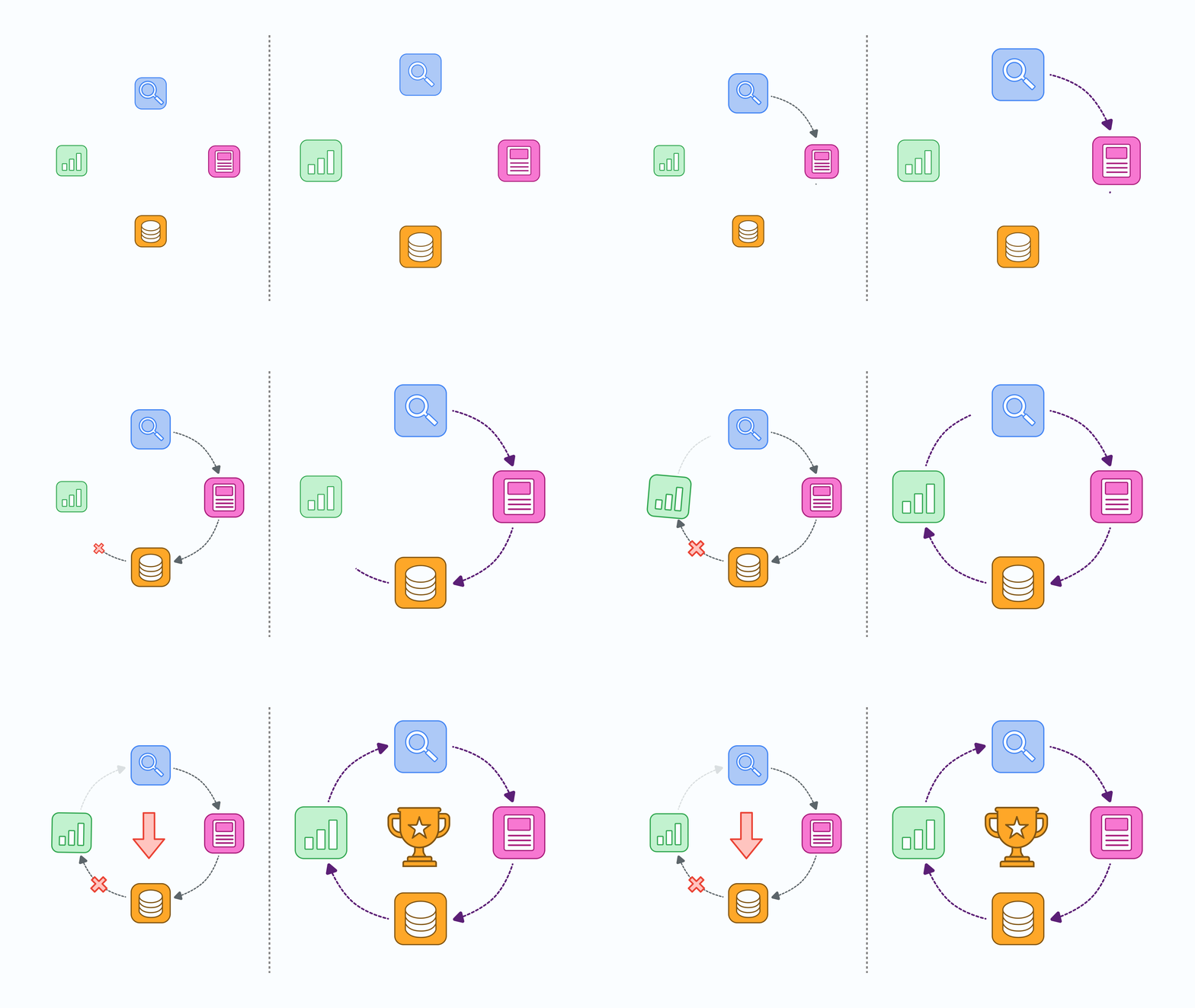
Offline conversion tracking is the process of importing revenue events from your CRM back into Google Ads, so Smart Bidding optimizes toward the clicks that actually generate qualified pipeline and closed deals, not clicks that generate form fills. Simply put, it closes the loop between Google Ads and your CRM.
The sequence is simple. A prospect clicks your ad, submits a form on your website, becomes a lead in your CRM, gets qualified into an SQL, moves through your pipeline, and eventually closes as a customer.
This entire journey takes 60, 90, sometimes 180 days in B2B SaaS.
Without OCT, Google only sees the form fill on day one. It has no idea whether that form fill turned into a customer on day 90. OCT tells Google exactly which of those clicks generated real revenue, and it uses that data to find more of them.
If your Google Ads account is running without OCT, you're literally flying blind. Smart Bidding is doing exactly what you told it to do: find cheap form fills. Now, whether those form fills become customers isn't a question the algorithm can answer because you never gave it that information.
How does offline conversion tracking actually work?
It happens in four steps. Every step is equally important, so if you skip one, the entire loop breaks.
Step 1: GCLID capture.
When someone clicks your Google ad, Google appends a unique identifier called GCLID (Google Click Identifier) to the URL. That GCLID identifies the specific click.
You need to capture that GCLID when the prospect fills out your form and pass it into your CRM as a hidden field on the lead record.
Step 2: CRM storage.
The GCLID lives in the CRM alongside the rest of the lead data. It stays there permanently, attached to that specific person, regardless of what happens next in the sales cycle.
Step 3: Status change trigger.
Once a lead reaches a meaningful milestone (SQL, opportunity, or closed-won), your CRM automatically triggers a workflow that captures the GCLID, conversion type, conversion value, and timestamp.
Step 4: Import back to Google Ads.
Your CRM then sends that data back to Google Ads through either a native integration (HubSpot and Salesforce both support this) or a scheduled file upload.
Google matches the GCLID to the original ad click and attributes the conversion to the correct campaign, keyword, and ad.
Once the data starts flowing, Smart Bidding uses it to retrain. Within 30 days, you'll see the account start finding different traffic. Within 60 days, the CPA numbers might not look dramatically different, but the pipeline behind them will look completely different.
Why does OCT matter more for B2B SaaS than any other vertical?
Because the gap between form fill and revenue is bigger, wider, and messier in B2B SaaS than in almost any other category.
An e-commerce brand knows within an hour whether a click became a purchase.
A B2B SaaS company waits 60 to 180 days to find out, and half the form fills that come in were never going to close anyway.
If you are running a B2B SaaS account without OCT, here’s what’s going to happen:
You will launch campaigns. Form fills will start coming in at $80 CPL.
On one hand, your marketing team will celebrate; on the other, your Sales team will complain that the quality of leads is trash. Marketing will defend the campaign using volume; Sales will push back on close rate.
All this time, your Google Ads will optimize toward the wrong number.
The entire argument will end the minute you go live with OCT.
With offline conversion tracking, you will be able to see exactly which keywords generate SQLs, which campaigns generate closed deals, and which ad copy correlates with real customers.
It will also bring Marketing and Sales onto the same page, helping them view the same numbers as indicators of success. And the most important of all, Google will start finding traffic that actually converts.
The compounding effect is massive.
For a deeper look at how OCT fits into the broader account, my B2B Google Ads strategy breakdown covers where it sits in the full framework.
How do you capture GCLID on your website?
The process itself is simple. The challenge is ensuring the GCLID stays intact from the first click to the final conversion.
When someone clicks your Google Ad, the URL they land on will look something like: yourdomain.com/pricing?gclid=abc123xyz. That gclid parameter is the “identifier” you need to capture.
There are 3 ways to do this.
1. Cookie storage.
Set a first-party cookie that captures the GCLID the moment the visitor lands on any page, and stores it for the length of your typical sales cycle (90 days is standard). Every subsequent form the visitor fills out reads from that cookie and populates a hidden GCLID field.
2. Hidden form field.
Every form on your site needs a hidden field called gclid. The form's JavaScript reads the value from the cookie and populates the field before submission.
3. CRM field mapping.
Your CRM needs a corresponding field to receive the GCLID.
- In HubSpot, this is a custom contact property.
- In Salesforce, a custom field on Lead and Contact objects.
Whatever the CRM, the field has to exist before any of this works.
The mistake most companies make is only capturing GCLID on their main demo form. Prospects don't always convert on the first form they see. Sometimes they download a resource first, then request a demo three weeks later. If your resource form isn't capturing GCLID, the demo request loses attribution. Every form needs the hidden field, without exception.
How do you set up OCT with HubSpot?
HubSpot has a native Google Ads integration that handles most of the heavy lifting. Here's the flow
Step 1: Create a custom property.
In HubSpot, create a custom contact property called "GCLID" as a single-line text field.
This is where the identifier gets stored.
Step 2: Update your forms.
For each HubSpot form, add a hidden GCLID field mapped to the custom property.
HubSpot's form tracking will pass the value from the URL or cookie automatically if you configure it correctly, but I recommend verifying by testing a live click on every form.
Step 3: Connect Google Ads in HubSpot.
Under Marketing > Ads, connect your Google Ads account.
HubSpot will authenticate the connection and let you configure which lifecycle stages should send conversions back to Google.
Step 4: Configure conversion events.
Map lifecycle stages to Google Ads conversion actions. In most B2B SaaS accounts, I set up two conversion actions:
- SQL (fires when a lead becomes sales qualified)
- Closed-Won (fires when a deal closes as a customer)
Both send back to Google Ads with associated revenue values.
Step 5: Verify the flow.
Submit a test form with a manually appended GCLID. Wait for the contact to sync into HubSpot. Manually change the lifecycle stage to SQL. Confirm the conversion appears in Google Ads within 48 hours.
The HubSpot integration is clean when it works, but the workflow configuration is where accounts break. If lifecycle stages aren't consistent across sales and marketing, the wrong events fire and OCT sends bad data back to Google.
The Google Ads optimization checklist I use has HubSpot-specific verification steps that catch this before it corrupts the account.
How do you set up OCT with Salesforce?
Salesforce is more powerful but more complicated. The connection uses Google's Salesforce integration, and the field mapping matters enormously.
Step 1: Create custom fields.
Add three custom fields to your Lead and Contact records:
- GCLID (text)
- Google Ads Click Timestamp (date/time)
- Conversion Status (a picklist that matches your Google Ads conversion action names)
Step 2: Update Web-to-Lead forms.
Add hidden fields to the forms that store the GCLID and click timestamp. Then, configure your form platform (Marketo, Pardot, HubSpot) to map those values to the matching Salesforce Lead fields when a new lead is created.
Step 3: Configure the Google Ads Salesforce integration.
Inside Google Ads, connect your Salesforce account under Tools > Measurement > Google Ads and Salesforce.
Google will guide you through mapping Salesforce stages to Google Ads conversion actions.
Step 4: Set up automation for status changes.
When a Lead becomes Contact (or an Opportunity moves to Closed-Won), a Salesforce workflow or process needs to trigger the conversion send.
Even though Google's integration handles most of this automatically once mapping is configured, I always verify with test data before going live.
Step 5: Enterprise data validation.
Salesforce is powerful enough to make big mistakes at scale.
Hence, before enabling automated conversion imports, run 30 days of test conversions manually and verify Google is receiving them correctly.
This is a step I never miss because automated bad data at Salesforce scale can corrupt an account faster than any other setup mistake.
What lead quality changes should you expect after OCT?
You should see real changes within 30 to 60 days; not a small lift, but a structural shift.
The First 30 Days:
Google Ads starts receiving offline conversions. Smart Bidding sees which clicks generated real SQLs versus which clicks generated form fills that went nowhere. The algorithm starts adjusting bids and traffic sourcing accordingly.
The Next 30 Days:
This is the time when the compounding kicks in. You'll notice cost per lead might stay flat or even rise slightly, but cost per SQL drops. Not because you're getting fewer leads, but because more of the leads you're getting are actually qualified.
The Road from 60 to 90 Days:
This is the time when the transformation becomes obvious. Sales stops complaining about lead quality. The pipeline you're generating starts closing at higher rates.
Guru is the clearest example I've seen recently. They came to ScalixAI spending significant budget every month with no reliable way to know whether any of it was actually filling the pipeline.
Attribution was broken, conversion data was unreliable, and their previous setup optimized toward form fills that weren't converting.
We rebuilt the tracking layer from the ground up, tightened targeting to their real ICP, and aligned every campaign to qualified demo requests as the true conversion event.
Within 65 days, demo volume nearly tripled month over month and cost per demo dropped by more than half. That entire result was possible because we fixed the offline conversion tracking, allowing Smart Bidding to retrain on clean data.
What are the biggest OCT mistakes in B2B SaaS?
Four mistakes cause 90% of OCT failures I see. Every one of them is fixable if you know what to look for.
- Optimizing toward the wrong conversion action. If you tell Google to optimize for "Lead" but your money is in "SQL," the algorithm will find you plenty of leads that never become customers. The primary conversion action needs to be the one that correlates most closely with revenue. For most B2B SaaS accounts, that's SQL or Qualified Opportunity, not Lead or Demo Booked.
- GCLID capture on only some forms. Every form on your site needs the hidden GCLID field. Missing it on your resource downloads, newsletter signups, or webinar registrations means those touchpoints lose attribution when the prospect later converts on a demo form. The attribution model breaks.
- Sending conversions back too late. If your SQL definition requires a 30-day nurture cycle and you only send the conversion after that, Smart Bidding is training on 30-day-old click data. That's usable but not ideal. If possible, send an intermediate conversion (like Demo Booked or Sales Qualified) earlier in the cycle, and layer the closed-won signal on top.
- Bad data flowing into the account without validation. Automated conversion imports can send garbage into Google Ads if your CRM workflows are misconfigured. I run a manual validation for the first 30 days of every OCT deployment. By rule, I never automate what I haven't tested first.
Companies looking at their conversion rate strategies often assume the problem is the landing page or the ad copy when it's actually a tracking problem. If OCT isn't set up right, no amount of CRO work will fix the account.
How does OCT interact with the rest of your account?
OCT touches every other part of the Google Ads account, and setting it up correctly changes how everything else performs. The account structure I recommend for B2B SaaS accounts only works when OCT is feeding it clean data.
Bidding on competitor keywords, for instance, becomes measurable in a completely different way. Without OCT, you can only see cost per lead on competitor campaigns. With OCT, you can see cost per SQL and cost per closed deal per competitor. That data changes which competitors are worth attacking and how aggressively.
Demand Gen and Performance Max also benefit disproportionately from OCT. Both campaign types rely heavily on Smart Bidding, and both work best when Smart Bidding has revenue signals to optimize against. Running PMax without OCT is one of the fastest ways to burn budget on B2B SaaS accounts.
If you're comparing agencies, the top Google Ads agencies in the US all handle OCT setup as a baseline. Any agency that treats it as an add-on or upsell is signaling they don't understand how B2B SaaS accounts actually perform.
The $1M Google Ads Playbook (B2B SaaS Edition)
The exact framework I use to build compounding Google Ads accounts. Campaign architecture. OCT setup step by step. Smart Bidding progression. Ad copy standards. The 30/60/90 rollout. Everything from nine years inside Google, in one downloadable playbook.
Download the Playbook →
The Bottom Line
At ScalixAI, Offline conversion tracking is not optional. It's the difference between an account that finds you customers and an account that finds you form fills.
Setting it up correctly is technical work that requires precision, but the framework is the same for every account:
- Capture GCLID at every form
- Store it in the CRM
- Trigger conversion events on real revenue milestones
- Validate the flow before you scale spend
Once OCT is live and clean, the compounding effect is significant.
Lead quality improves. Sales complaints drop. Smart Bidding stops chasing cheap form fills and starts finding the click profiles that generate closed deals.
Basically, the math on your Google Ads account changes in the direction that matters.
If your account isn't running OCT, or if it's running but you're not sure it's set up correctly, that's the highest-leverage fix available to you right now.