.webp)
Want this report on your own account?
Send us read access and we will send back one of these reports on your current Google Ads account, with the comparison logic applied and the three things we would change first.
Share this Article



Key takeaways
A weekly report has seven blocks that move from facts, to interpretation, to decisions. The order is what makes it readable.
Report on booked demos and cost per booked demo, not impressions, clicks or total conversions.
Compare every metric to the account's own trailing four-week average, not to published industry benchmarks.
Use the weekly report to run the account and the monthly report to answer the board. Cutting budget on a weak weekly number is the most common way B2B SaaS teams kill working campaigns.
Search for a PPC report template and almost everything you find is a dashboard. Widgets for spend, clicks, impressions and click-through rate, arranged on a page that refreshes itself. A dashboard can show you that cost per acquisition moved. It cannot tell you why, and it will not tell you what to do on Monday morning.
What is a Google Ads weekly report?
A Google Ads weekly report is a short written summary that compares the last seven days of account performance to the seven days before it, names which campaigns produced pipeline, and states what changes next week.
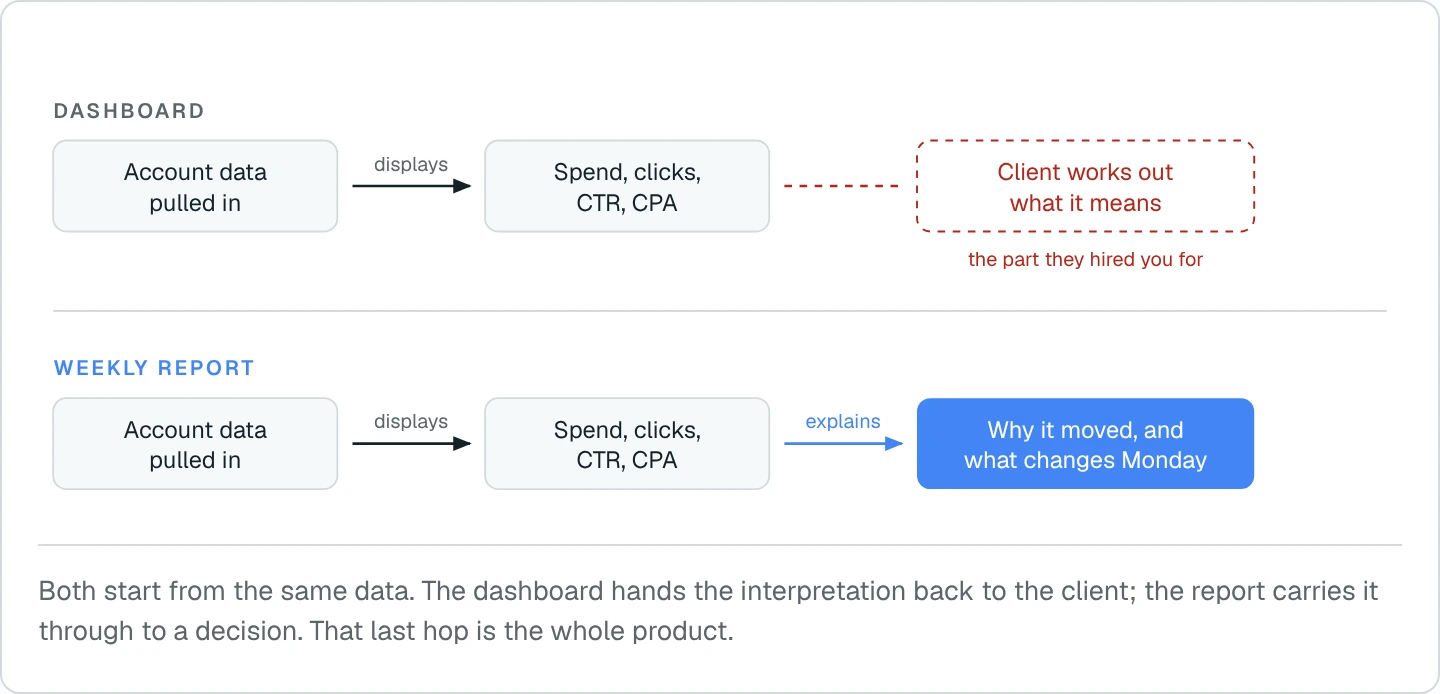
The gap matters most in B2B SaaS. Sales cycles run 45 to 90 days, weekly conversion counts are small, and a drop from eight demos to five looks like a collapse in a chart when it is often ordinary variance.
The numbers are the input. The judgement is the report.
What should a Google Ads weekly report include?
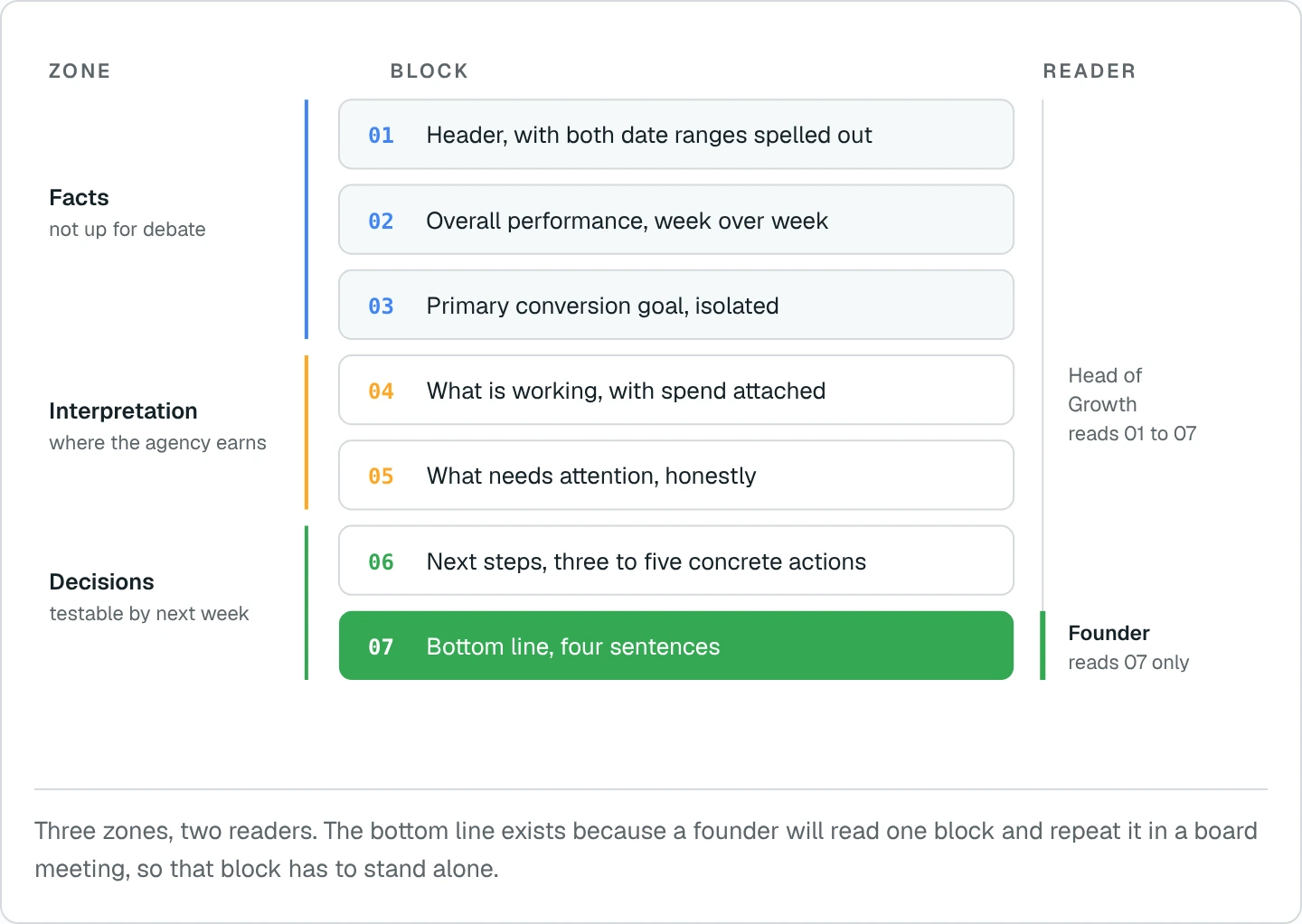
Seven blocks, in this order: header, overall performance week over week, primary conversion goal, what is working, what needs attention, next steps, and a bottom line.
The sequence is deliberate. Facts come first so nobody argues about them. Interpretation comes second, once the facts are settled. Decisions come last, when both are on the table.
01. Header
Client, channel, the reporting range and the comparison range, both written out in full. Never "this week". Someone will open this in three months and need to know exactly what was compared to what.
02. Overall performance, week over week
Spend, conversions, CPA and CTR split by campaign type, because Search CTR and Demand Gen CTR are not comparable and averaging them hides both. Five lines is usually enough. A report that opens with twenty metrics is a data dump nobody finishes.
03. Primary conversion goal
One goal, isolated. For B2B SaaS that is booked demos and cost per booked demo, each beside last week's figure. Pulling this out of block 02 is what stops a client reading a healthy total conversion count while demo volume quietly falls.
04. What is working
Named campaigns with the spend and the result attached. "Brand performed well" is not a finding. The spend figure has to be there, because a campaign delivering demos on half the budget is a different fact from one delivering the same demos on all of it.
05. What needs attention
Which campaigns spent without converting, how much, and whether this is a trend or a single week inside normal variance. This block builds the trust. A client burned by paid before is reading specifically to see whether you will tell them when something is not working.
06. Next steps
Three to five concrete actions, each testable by the next report. "Continue optimising" is not an action. Launching a named test campaign is. Carrying the same step across three reports without a result is a signal in itself.
07. Bottom line
State the headline number, name what caused it, give the counterweight if there is one, and name the single priority for next week.
What does a completed Google Ads weekly report look like?
Below is an actual ScalixAI weekly report for a B2B SaaS client in IT service management, with names changed and every number left as reported.
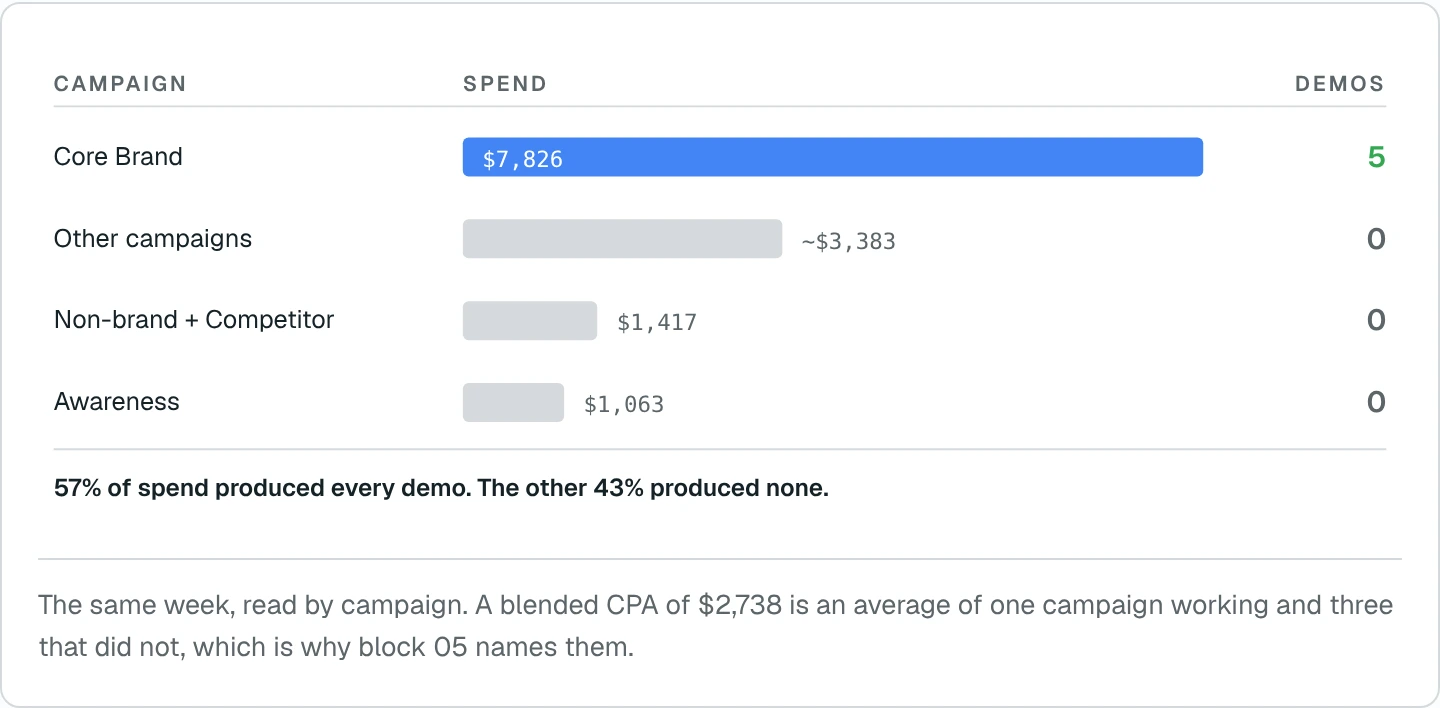
We picked a week where performance dropped. Demos fell from eight to five, spend rose, and CPA went up 74%. A reporting format that only looks good in good weeks is a sales document.
.webp)
#download::Download the one-page sample report (PDF)::https://cdn.prod.website-files.com/69f0be63e9183e578869c4f0/6adf36ce43bf9eb3ce546a09_ScalixAI-Sample-Weekly-Report.pdf
What should each metric be compared against?
Compare every weekly metric against the account's own trailing four-week average and the client's unit economics, not against a published industry benchmark.
Industry benchmarks average ecommerce, local services and B2B together, which makes them close to useless for a company selling a $5,000 to $50,000 ACV to a buying committee. A $2,700 cost per booked demo is alarming against a generic benchmark and perfectly healthy against a $40,000 ACV with a 25% close rate. If you want to run that maths on your own numbers, our Google Ads ROI calculator for SaaS works through CAC and LTV:CAC directly.
MetricCompare againstFlag the week whenSpendPrior week, and pacing against monthly budgetPacing is off by more than 15%Booked demosTrailing 4-week average, never last week aloneTwo consecutive weeks below the averageCost per booked demoClient ACV and close rate, not an industry figureCAC payback passes the agreed thresholdSearch CTRSame campaign, same period last monthA drop coincides with new competitor entryDemand Gen CTRIts own prior weeks only, never against SearchIt falls while frequency climbsNon-brand share of demosShare of total demos, tracked weeklyBrand delivers 100% of demos two weeks runningSQL rate from paid demosThe CRM, not the Google Ads conversion columnDemo volume holds while SQL rate falls
Two of these are worth defining precisely, because teams use them loosely: CAC payback period and the difference between an MQL and an SQL. If a report says "qualified leads" without specifying which, it is not a measurement, it is a mood. For CTR specifically, our CTR calculator shows how a given rate compares across Google and LinkedIn for B2B.
Google Ads will report a healthy conversion count while the sales team quietly stops taking those meetings seriously. Reconciling against the CRM weekly is the only way to catch it early.
Should B2B SaaS teams report weekly or monthly?
Weekly for operating decisions, monthly for pipeline and CAC. Both, written for different readers.
Weekly is right for bids, budgets, search terms and creative, where a week of bad data is cheap to correct. It is wrong for judging whether paid is working at all, because this week's demos close next quarter.
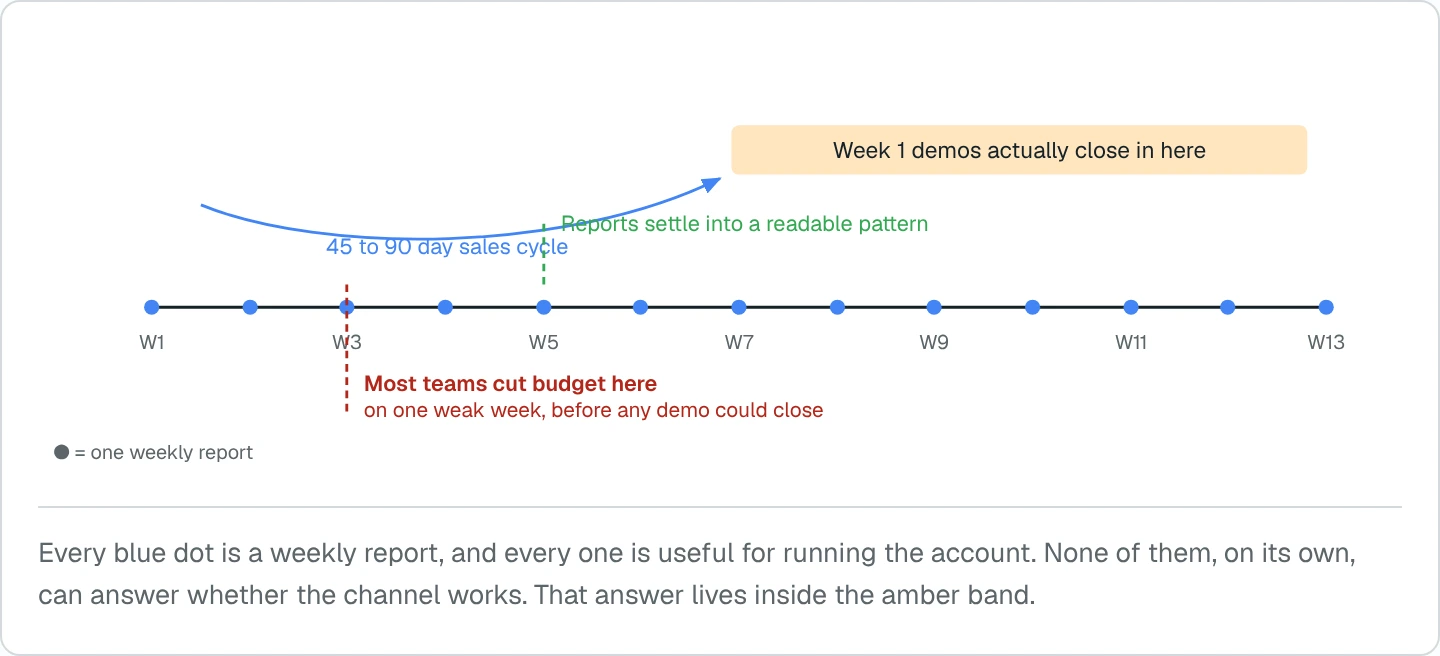
Teams that cut budget on a weak week routinely kill campaigns that were four weeks from compounding. That single mistake is the most common reason a B2B SaaS company concludes Google Ads does not work, and it is a measurement failure rather than a channel failure.
Why do most PPC weekly reports get ignored?
Because they report activity instead of decisions. Five failures account for nearly all of it.
01. Leading with impressions
Diagnostic inputs, not performance measures. A report that opens with impression share was built for ecommerce and handed to a SaaS client unchanged.
02. Comparing to last week only
With five to ten conversions a week, last week is noise. Without a trailing average, the report manufactures a crisis every second week.
03. Platform conversions as pipeline
A booked demo in Google Ads and a qualified opportunity in the CRM are different numbers. Confusing them keeps a client happy for two months and loses them in the third.
04. Brand and non-brand blended
Brand captures demand that already exists and always looks efficient. One blended CPA hides whether the account is creating demand or harvesting it.
05. The same next steps every week
"Continue optimising keywords and bids" in four consecutive reports means nothing is being tested. The format should make that stall visible.
How do we build these reports every week?
Data collection is automated through AI and MCP connections into the ad platforms and the CRM. The written read is done by the person running the account.
Pulling spend, conversions, CPA and CTR across campaigns, matching them to the prior period, and reconciling platform conversions against CRM records is work with no judgement in it. We connect the platforms directly, so nobody exports a CSV on a Monday morning.
Deciding that a 74% CPA rise is a brand concentration problem rather than a bidding problem, and that the answer is a keyword test rather than a budget cut, is the part that needs years of platform knowledge. That does not get automated.
This is why the reports land the same day every week and still read like a person wrote them. It is also why they stay short. When gathering the numbers costs nothing, there is no temptation to pad the report with everything that was collected.
Can the same template be used for LinkedIn Ads?
The seven blocks transfer. The comparison logic does not.
LinkedIn campaigns in a demand creation role should be judged on reach into the target account list, frequency against the buying committee, engagement rate and assisted pipeline. Judging them on last-click cost per conversion is how most B2B teams conclude LinkedIn does not work, when what they measured was a demand creation channel using a demand capture scorecard.
In practice we run both reports with the same structure and a different block 02. Google answers whether existing demand is being captured efficiently. LinkedIn answers whether new demand is being built in the accounts that matter.