Know what your next budget step will cost before you take it
Share this Article



Key takeaways
Google says budget changes don't trigger Learning status in Smart Bidding campaigns.
CPA rises when scaling because extra budget buys worse and pricier auctions.
Average CPA hides cost; judge every budget step on its marginal CPA.
Impression share lost to budget shows whether more spend buys cheap volume.
Since August 2026, budget-limited Target CPA campaigns now deliver closer to target.
Scaling Google Ads usually goes the same way. A campaign hits its CPA for two months, someone raises the budget by 50%, and three weeks later CPA is up 30%, and sales says the new leads are worse. The usual explanation is that the budget jump "reset the algorithm."
That's mostly wrong. Google says budget changes don't put Smart Bidding back into learning. CPA rises because the extra budget buys worse auctions than the ones you were already winning. A good ramp plan finds the point where that happens and stops you at exactly that moment, helping you avoid overpaying.
How do you scale Google Ads budget without breaking CPA?
Scale Google Ads by checking for room to grow before increasing budget. Raise it in steps, holding each increase for at least two weeks or two conversion cycles. Judge each increase by marginal CPA (the cost of the additional conversions), not average CPA. Before scaling, set a maximum marginal CPA, a minimum SQL rate, and clear rules for when to roll back. If a campaign has no more room to grow efficiently, expand through new keywords, markets, or campaigns instead of adding more budget.
Does increasing your budget reset the Google Ads learning phase?
No. Google's documentation says changing daily budgets "takes effect immediately and allows campaigns to scale without triggering 'Learning' status" (Google Ads Help). Learning is triggered by bigger structural changes like a new bid strategy, adding or removing campaigns, ad groups, or keywords, or a significant change to conversion goals.
That doesn't make big budget jumps safe. Two things still happen:
- Daily spend gets noisy. Google can spend up to 2x your average daily budget on a given day, capped at 30.4x the daily budget for the month (Google Ads Help). Judge budget changes by the week, never by the day.
- The auction mix changes. More budget lets Google enter auctions it was skipping. Those are usually lower-intent queries, pricier clicks, or both.
So the ramp isn't about protecting the algorithm. It's about measuring what each new dollar actually buys.
Why does CPA go up when you scale Google Ads?
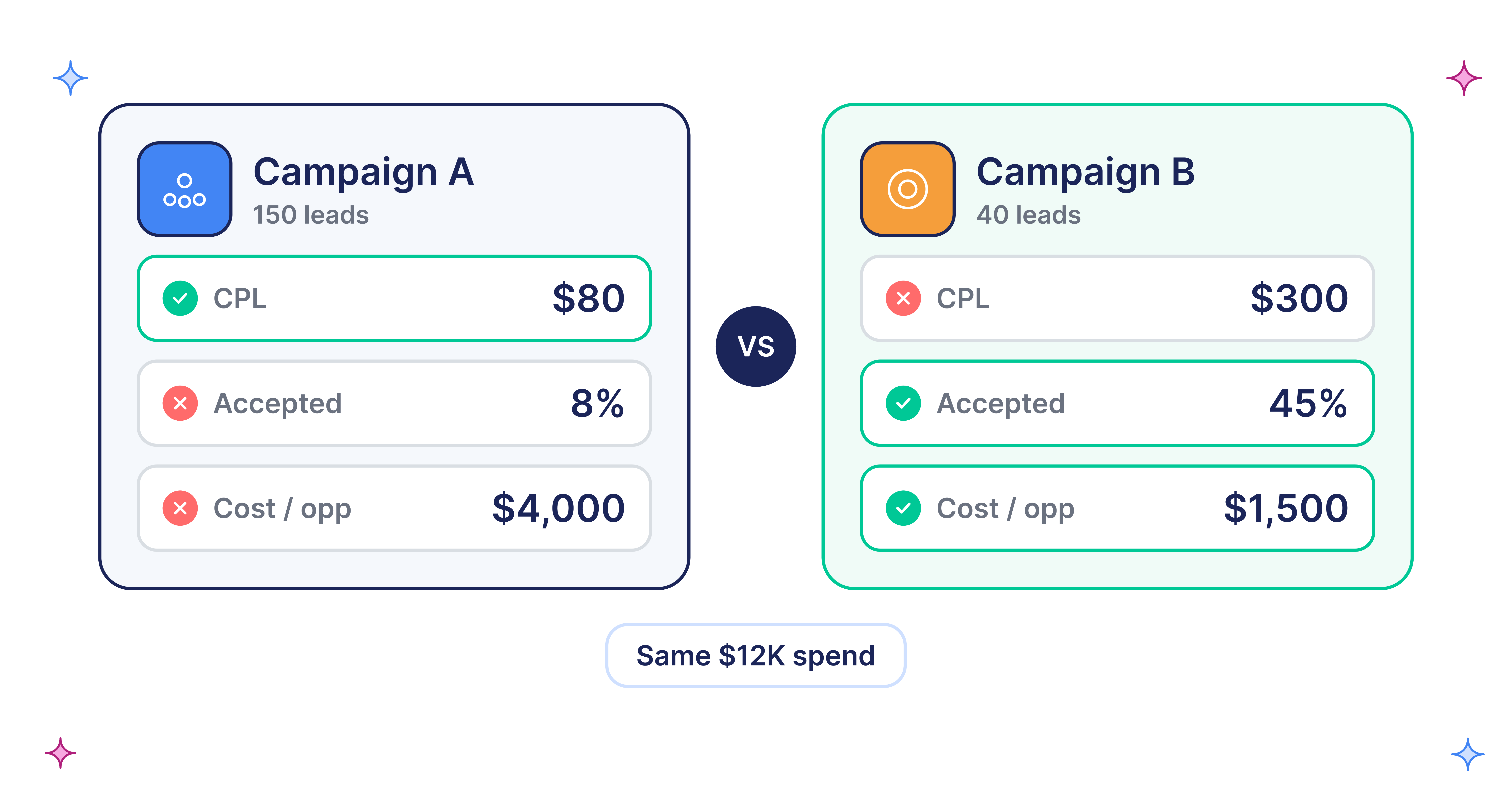
CPA goes up because your extra budget buys the next-best auctions, which convert worse or cost more than the ones you already win. Your average CPA rises slowly, which hides how much the new conversions really cost. That cost is your marginal CPA:
Marginal CPA = (new spend − old spend) ÷ (new conversions − old conversions)
Suppose an AI analytics tool spends $20,000 a month and books 100 demos, a $200 CPA. Budget goes to $26,000, and demos rise to 120. Average CPA is now $217, up only 8%, so the dashboard looks fine. But the extra $6,000 bought 20 demos, a marginal CPA of $300. If the business can only afford $280 per demo, that step lost money while the report showed a small change.
This is why "CPA only went up a little" is a dangerous sentence. Small average changes can hide marginal costs that are 50% higher.
How to check headroom before you add budget
Headroom is how much more you can buy before quality or price drops. The search impression share columns tell you where the extra volume will come from:
- High lost IS (budget), low lost IS (rank): You already win these auctions but run out of money. More budget buys more of the same traffic. This is the cheapest kind of scaling.
- Low lost IS (budget), high lost IS (rank): You're losing on bid or ad quality. More budget alone won't help. You'll need higher bids or a looser target, so marginal CPA will rise faster.
- Low on both: This campaign is close to tapped out. Extra budget will push into broader, weaker queries. Scale by adding inventory instead.
Two more checks before increasing your Google Ads budget:
- Fix structure first. Broad match leaks, missing negatives, and weak landing pages get more expensive as budget grows. Our post on why AI startups' CAC runs high covers what to fix.
- Bid on what sales values. If bidding optimizes to form fills, scaling buys more form fills. Import SQLs with offline conversion tracking first.
Google's Performance Planner and budget simulator can forecast how conversions change with spend. Use them as a starting point, not a promise. They forecast platform conversions, not pipeline.
Set your guardrails before the first increase
Write these down before you touch the budget, and agree on them with whoever owns the number. Deciding after the results come in invites people to explain away a bad step.
[table]
Guardrail | What to track | Where to find it | Trigger | Action
Marginal CPA ceiling | Extra spend ÷ extra conversions per step | Google Ads, by week | Above ceiling for a full window | Roll back one step
Quality floor | Lead-to-SQL rate vs baseline | CRM, joined by GCLID | Falls meaningfully below baseline | Hold budget, review search terms
Volume check | Conversions per window | Google Ads | Too few to judge (under ~30) | Extend the window before deciding
Pacing | Weekly spend vs plan | Google Ads | Persistent overspend or underspend | Check targets and budget-limited status
Search term drift | Share of spend on new, irrelevant queries | Search terms report | Rising share of junk queries | Add negatives before next step
[/table]
Setting the ceiling: Work it back from ACV, margin, payback target, and close rate. Our Demand Gen target CPA guide walks through this "economic ceiling" math, and it works for Search too.
About the 30-conversion check: Google's Target CPA guidance suggests evaluating the last 30 days with at least 30 conversions. Fewer than that, and a step's result is mostly noise.
The ramp plan, step by step
- Baseline. Record two weeks or two conversion cycles, whichever is longer: spend, conversions, CPA, SQL rate, and impression share lost to budget and rank. That evaluation window comes from Google's own learning period guidance.
- Pick the step size by headroom. With high lost IS (budget), steps of about 20% to 30% are reasonable. With little headroom, use smaller steps or skip to adding inventory. These are working ranges, not Google rules.
- Change one thing. Don't raise budget and change the target or structure in the same window. Our Smart Bidding progression guide covers why.
- Hold for a full window. Wait the full two weeks or two conversion cycles before judging. In B2B, a demo booked today may not become an SQL for weeks, so use a leading signal such as sales-accepted leads.
- Score the step. Calculate marginal CPA and SQL rate for the step. Write it in the ramp log.
- Decide. If all guardrails hold, take the next step. If marginal CPA is near the ceiling, hold the budget for another window. If it stays above the ceiling for a full window, roll back to the last budget that performed well.
- When headroom runs out, add inventory. New keyword themes from PPC keyword research, competitor campaigns, new countries, or Demand Gen. Each new campaign starts its own ramp.
Low-volume accounts: If a campaign gets only a handful of conversions a month, small steps produce results you can't read. Use fewer, larger steps with longer windows, or consolidate campaigns so each one has enough data.
What Google's August 2026 bidding change means for scaling
Starting August 17, 2026, Google changed how it optimizes budget-limited campaigns that use Target CPA or Target ROAS (Google Ads Help). These campaigns now deliver closer to the target you set, instead of beating it while capped by budget.
That matters when you scale. Say your Target CPA is $300, but the campaign has been delivering $200 because it was budget-limited. Raise the budget, and Google may now spend toward $300. Your CPA "breaks," but the system is doing exactly what the target allows.
Before you scale, set the target to the marginal CPA you're actually willing to pay. The target is now one of your guardrails. Google won't change it for you.
Case study: tripling spend after fixing the signal
A B2B SaaS company that automates cold email infrastructure had spent $70,000 with another agency and was barely breaking even. ScalixAI rebuilt conversion tracking around events that led to paying users, moved budget to campaigns that drove revenue, and scaled spend only after performance held. As published in the case study, ad spend tripled, cost per conversion dropped 60% to 80%, and MRR grew 43% in one month. Read the SaaS paid ads ROI case study.
The order matters more than the numbers: signal first, structure second, budget last. Results like these depend on the account and aren't typical of every ramp.
The bottom line
Budget changes don't reset Google's learning. CPA breaks because extra budget buys worse auctions, and average CPA hides how much worse.
Check headroom, set a marginal CPA ceiling and an SQL floor before you start. Raise budget in steps held for two weeks or two conversion cycles, and roll back when a step crosses the line. When a campaign runs out of headroom, grow the account, not the budget.
ScalixAI helped Oneleet, PAM, Slash, and many other companies scale. Explore our Google Ads management services for B2B SaaS. Book your audit to see what’s stopping you from scaling.