Find out if your Demand Gen budget can support your target
Share this Article



Key takeaways
Your Demand Gen target CPA is a range with a floor and a ceiling.
The floor is the higher of the auction price and the lead quality cutoff.
Your ceiling is the lower of economics and budget divided by twenty.
If the floor exceeds the ceiling, change the conversion, not the bid.
Most failing Demand Gen accounts bid on demos with signup-sized daily budgets.
Target CPA bidding in Demand Gen fails in two predictable ways. Set the target too low, and the campaign stops spending, or it fills your CRM with cheap junk. Set it too high, and it burns budget on conversions your sales team cannot close at a profit.
Most advice says to start near your average CPA, which gives you one number and no way to tell when it's wrong. It’s best to set a range instead. This includes a floor you can't go below and a ceiling you can't go above. The target lives between them, and the size of that gap tells you whether Demand Gen can work at your budget at all.
How do you set a target CPA for a Demand Gen campaign?
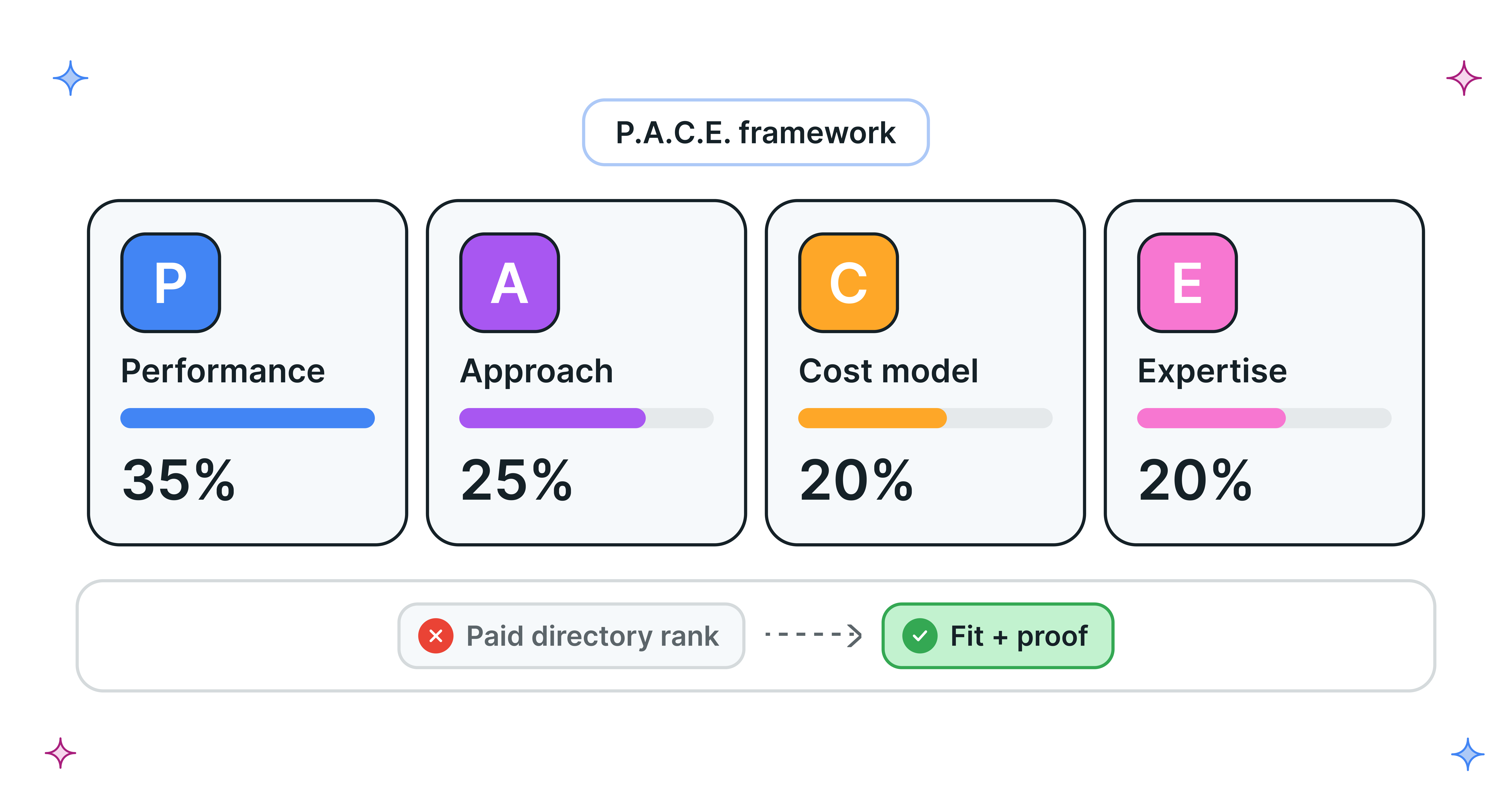
Set a target CPA for Demand Gen by working out four numbers. The floor is the higher of your market CPA (what the auction actually charges) and your quality CPA (below which leads turn into junk). The ceiling is the lower of your economic CPA (what a conversion is worth) and your budget CPA (daily budget divided by 20). Start your target near the floor and move it only inside that range.
If the floor is higher than the ceiling, no target CPA will work. You need a different conversion event, a bigger budget, or a different campaign type.
Why Demand Gen needs a range, not one number
Demand Gen behaves differently from Search in ways that make one fixed target risky:
- Conversions arrive late. A viewer may sign up next week and become an SQL next month, so your 30-day CPA is always incomplete.
- There is no CPC safety net. Google's bid limits only work for portfolio Target CPA strategies, and only in Search Network auctions (Google Ads Help). In Demand Gen, the target CPA is your only lever.
- One goal per campaign. Google recommends a single conversion goal per Demand Gen campaign and calls changing it on a live campaign "the biggest reset to learnings" (Demand Gen performance guide). Your target and your conversion event are and should be one decision.
The four numbers that set your target CPA
[table]
Boundary | What sets it | Where the data comes from | What happens if you cross it
Market floor | What the auction charges for your conversion | 4 to 6 weeks of Maximize Conversions | Campaign underspends and loses volume
Quality floor | The CPA where lead quality collapses | CRM: SQL rate by CPA band | Cheap conversions that sales rejects
Economic ceiling | What one conversion is worth to the business | Finance and CRM funnel rates | Profitable-looking CPA, unprofitable customers
Budget ceiling | How many conversions the budget can buy to learn | Daily budget divided by 20 | Too few conversions for bidding to learn
[/table]
How to find your floor
The market floor
Run Maximize Conversions first. Google suggests starting there until you have more than 50 Demand Gen conversions. After 4 to 6 weeks, your average CPA is the market floor. It's what the auction charges today for your audience, creative, and conversion.
Google's recommended target CPA is the same idea. Basically, your last 30 days of CPA adjusted for conversion delays. Google also warns that a target set too low makes you skip clicks that could have converted. A target well below your market floor won't make conversions cheaper. It will just stop the campaign from spending.
The quality floor
The quality floor is the CPA below which conversions stop turning into pipeline. To find it, export Demand Gen leads from your CRM and group them by week or ad group. Put each group in a CPA band and compare the SQL rate across bands.
SQL rate usually holds steady, then drops sharply at the cheapest band. That drop is your quality floor. Cheap conversions in Demand Gen often mean accidental app clicks, students, or bots. Our guide to spotting Google Ads spam leads shows how to tell which kind you're dealing with.
How to find your ceiling
The economic ceiling
The economic ceiling is the most you can pay per conversion and still hit your payback target. Work backward from a closed deal:
- Allowed media cost per deal = (ACV ÷ 12) × gross margin × target payback months × media share of CAC
- Economic ceiling = allowed media cost per deal × conversion-to-close rate
Use the close rate of Demand Gen leads specifically, measured in your CRM. Demand Gen leads usually close at a different rate than Search leads, and Google's conversion counts can include view-based credit that never shows up as pipeline. Offline conversion tracking is how you get the real rate. The Google Ads ROI calculator is a quick way to check the inputs.
The budget ceiling
The budget ceiling is the highest target CPA your budget can feed. Google's guidance on Demand Gen budgets ranges from 10x the target CPA (performance guide) to 15x (implementation guide) to at least 20x (low-budget troubleshooting page). For B2B, where conversions come in late, use the conservative number:
Budget ceiling = daily budget ÷ 20
Above this, the campaign buys too few conversions per day to learn. Google also notes that ad groups with more than 50 conversions perform better, so check monthly volume too.
A worked example: signups pass, demos fail
All numbers below are hypothetical.
An AI meeting assistant sells to mid-market teams. ACV is $12,000, gross margin is 80%, the payback target is 12 months, and media gets 50% of CAC. Demand Gen budget is $1,500 a day.
Allowed media cost per deal: $1,000 × 0.8 × 12 × 0.5 = $4,800
[table]
 | Work-email signup | Demo booked
Conversion-to-close rate (Demand Gen cohort) | 2% | 20%
Economic ceiling | $96 | $960
Budget ceiling ($1,500 ÷ 20) | $75 | $75
Market floor (Max Conversions, 5 weeks) | $58 | $420
Quality floor (CRM CPA bands) | $40 | n/a
Usable range | $58 to $75 | None
[/table]
For signups, the range is $58 to $75. A starting target of about $60 sits just above the floor and buys roughly 750 signups a month, which is plenty of data.
For demos, the market floor ($420) is far above the budget ceiling ($75). Supporting a $420 target at 20x would take $8,400 a day. At this budget, a demo-optimized Demand Gen campaign will starve. That's not a bidding problem. The conversion event is wrong for the budget.
Note that the budget, not the economics, sets the signup ceiling. At $2,000 a day, the budget ceiling rises to $100, and economics ($96) becomes the limit. That tells you how far Demand Gen can scale.
What if your floor is higher than your ceiling?
Change the setup, not the target:
- Move the conversion up the funnel. Optimize to a signup or a qualified signup (work email, company size from enrichment) and let sales or the product handle the rest.
- Consolidate ad groups. Fewer ad groups means more conversions per ad group, which helps you reach the 50-conversion mark.
- Raise the budget if the economic ceiling has room, so the budget ceiling stops being the limit.
- Run Maximize Conversions or Maximize Clicks while you build data. Google's guide says Maximize Clicks needs no minimum budget.
- Use Search first. If you can't afford Demand Gen's data needs, capture existing demand on Search and come back later.
How to adjust the target inside the range
Once the target is live, move it slowly and read the right signals:
- Change in small steps. Google advises keeping total target changes within +/- 15% over a campaign's life, in steps of about 5% to 10% a week.
- Read budget use. Google says a healthy campaign uses about 80% or less of its daily budget while hitting its target. Spending well under budget with low volume means the target is too tight. Raise it toward the ceiling.
- Wait for 30 to 50 conversions after each change before judging it, and include enough days to cover conversion lag.
- Set ad-group targets. Demand Gen allows a different target CPA per ad group, so remarketing and lookalike ad groups can each sit in their own range.
- Don't change bids and budget together. Our Smart Bidding progression guide covers this sequencing.
Case study: FYXER's conversion signal fix
FYXER's account was optimizing to page views and generic form fills. ScalixAI moved demo signups and free trial activations with intent signals to primary, and used Target CPA only on campaigns with enough conversion history. Google Ads went on to bring in more than 10,000 customers and now drives 12% of FYXER's ARR. Read the FYXER case study.
The bottom line
A Demand Gen target CPA is a range, not a guess. The floor comes from the auction and your lead quality. The ceiling comes from your unit economics and your budget. If the floor sits above the ceiling, stop adjusting the bid and change the conversion event, budget, or campaign type. Most Demand Gen accounts that "don't work" are trying to bid on demos with a signup-sized budget.
Want us to run your Demand Gen campaigns like Fyxer? Check out our Google Ads services for AI companies.