Get a second opinion on where your spend goes
Share this Article



Key takeaways
Broad match and Demand Gen buy whatever your conversion action calls success.
Junk traffic comes in three types, and each needs a different fix.
A sudden drop in cost per lead is usually bots, not efficiency.
Blocking spam in your CRM still lets Smart Bidding learn from spam.
Import qualified pipeline stages so Google chases buyers instead of cheap forms.
Google Ads spam leads usually show up the same month someone turns on broad match or launches a Demand Gen campaign. Cost per lead drops. Form fills climb. The platform says the campaign is working. Then sales opens the CRM and finds students, competitors, fake names, and Gmail addresses that never reply.
Negatives, app exclusions, and CAPTCHAs help, but they do not stop the junk from coming back. Broad match and Demand Gen are buying exactly what your conversion action tells them counts as a win.
Why are broad match and Demand Gen bringing me junk traffic and spam leads?
Broad match and Demand Gen bring junk traffic because both let Google's AI decide who sees your ad, and that AI chases whatever you count as a conversion. If a form fill is the conversion, the cheapest form fills win. Bots, students, job seekers, and accidental app clicks are the cheapest form fills you can buy.
Broad match matches on signals such as the user's recent searches, your landing page, and the other keywords in the ad group, according to Google's keyword matching documentation. Demand Gen now serves on YouTube, Discover, Gmail, and the Google Display Network, because Google is moving Display campaigns into Demand Gen (Google Ads Help). Both give the algorithm more room. More room plus a weak conversion signal produces more junk.
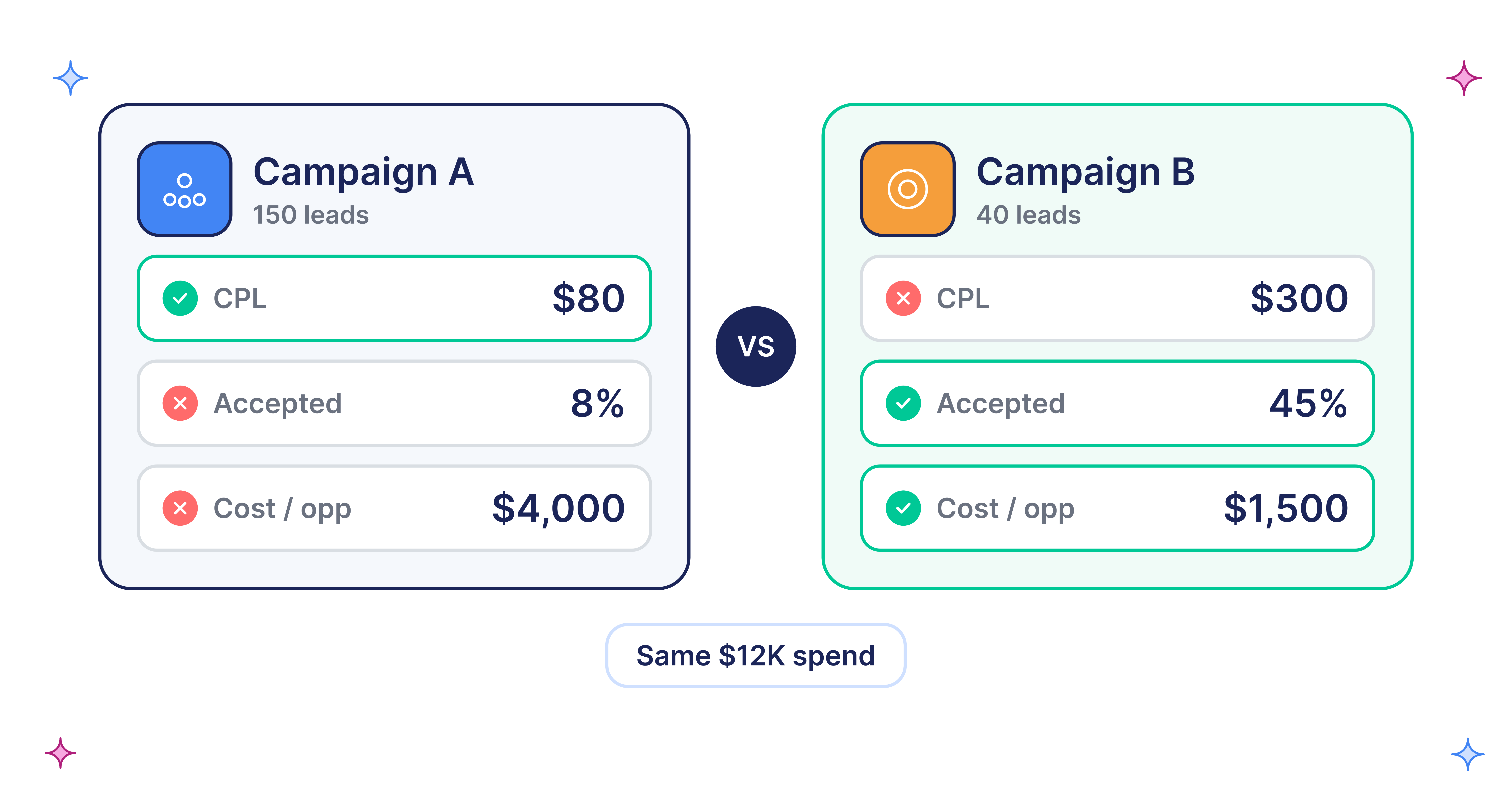
Let me explain it with an example. Suppose there is an AI note-taking startup that runs broad match on "AI meeting notes." A few students fill out the demo form looking for a free tool. Smart Bidding sees cheap conversions and bids harder on similar people. A month later, cost per lead is down 40%, and most leads are unqualified. The system did what it was told.
The three types of junk traffic and how to tell them apart
Junk traffic is three different problems, each with its own fingerprint. Treat them as one, and you add hundreds of negatives and still get spam.
[table]
Junk type | Where it hides | Fingerprint in your data | First fix
Wrong-intent humans | Broad match search terms | Real people, personal emails, queries with "free," "jobs," "course," "login"; leads reply but never qualify | Themed negative keyword lists, tighter ad groups, qualified conversion goal
Wrong-placement humans | Demand Gen on Display Network and mobile apps | High CTR, very short sessions, leads who don't remember filling a form | Opt out of Display Network per ad group, account-level placement exclusions
Bots and spam | Display, apps, Search partners | Cost per lead suddenly far below normal, forms filled in seconds, gibberish fields, overnight spikes | Form validation, honeypot field, fire conversions only after validation
[/table]
The bot pattern is the easiest to see. One advertiser on r/googleads described a Demand Gen campaign that produced hundreds of leads in under a day at less than $1 each, against a normal cost per lead of about $50. A sudden collapse in cost per lead is usually bots, not a win.
How do you spot junk traffic before sales complains?
Spot junk traffic by joining raw ad data to CRM outcomes. The dashboard counts conversions, not pipeline. Work from raw exports:
- Run n-gram analysis on the search terms report. Split 30 to 90 days of terms into single words and two-word phrases, then total cost and qualified leads for each. Words like "free," "template," "jobs," and "login" surface fast. Google hides low-volume queries for privacy (Google Ads Help), so use Search terms insights to see the missing themes.
- Segment Demand Gen by channel and device. Compare YouTube, Discover, Gmail, and Display Network. Look for channels with many clicks and zero sales-accepted leads.
- Export raw form submissions with GCLID. Sort by email domain, time to submit, and hour of day. Clusters of free email domains or overnight spikes are a fingerprint.
- Join leads to CRM stages. For each campaign, compare leads, sales-accepted leads, and opportunities. Our offline conversion tracking guide shows how to pass GCLID through HubSpot or Salesforce.
- Add the Invalid clicks column. Google filters some invalid traffic before billing and credits some after (Google Ads Help). If invalid clicks rise with spam form fills, you have a bot problem, not an intent problem.
With a 60-day sales cycle, judge on sales-accepted leads, not closed deals. If your ads look fine but still don't drive pipeline, this is usually where the answer shows up.
How to stop broad match from buying junk
Fix what broad match learns from first, then fence what it can reach.
- Change the primary conversion. Make demo booked or SQL the primary goal and move raw form fills to secondary. Then import qualified CRM stages. Our guide to Smart Bidding progression covers when to move to value-based bidding.
- Build a negative keyword list by theme. Create shared lists for job seekers, students, free and DIY intent, competitor login queries, and unrelated industries. Negative keywords do not match close variants, so add plurals and misspellings yourself.
- Keep broad match in tight ad groups. Mixed themes send broad match a muddy signal. See how we structure a B2B SaaS Google Ads account by intent.
- Test Search partners off. Partner sites are a common spam source for lead gen accounts.
- Use broad match only where there is data. With only a few qualified conversions a month, Smart Bidding has little to learn from, so use phrase and exact match until volume builds. Good PPC keyword research makes those tighter campaigns work.
How to stop Demand Gen campaigns from buying junk
Control where Demand Gen campaigns serve and what they count.
- Opt out of the Display Network at the ad group level. Channel controls let you keep video on it and image ads off.
- Add an account-level placement exclusion list. One list now applies across Demand Gen, Performance Max, YouTube, and Display. Start with mobile app categories and kids content if your buyer is a VP at a 200-person company.
- Add qualifying questions to lead form assets. Prefilled forms make junk free to submit. Our review of lead form extensions explains the same trade-off on Search.
- Seed with first-party data. Lookalikes built from closed-won Customer Match lists give Demand Gen a better starting point than broad interests.
- Judge it on pipeline, not cost per lead. Demand Gen creates demand that Search later captures. Our Demand Gen playbook covers how to measure that.
Stop spam form submissions at the form
Bots that reach your form keep coming, whatever you change in Google Ads. Fix the form:
- Add a hidden honeypot field and reject any submission that fills it.
- Add invisible reCAPTCHA v3 or Cloudflare Turnstile.
- Block disposable and free email domains with a validation tool such as ZeroBounce or NeverBounce.
- Fire the Google Ads conversion only after validation passes.
Most teams miss that last point. Deleting spam in the CRM keeps sales happy, but if the tag already fired, Smart Bidding still learned that spam is a success.
Case study: how Delve turned broad intent spend into pipeline
Delve, an AI compliance platform, was spending on broad intent searches that rarely produced a qualified demo, and tracking counted form fills instead of demo bookings. We rebuilt keywords in intent layers, including an excluded-terms layer for students, job seekers, and researchers. Solution-aware campaigns kept phrase and broad match, with tight negative lists. Demo bookings became the primary conversion, and offline SQL signals trained bidding.
First qualified demos arrived within two weeks, and Google Ads drove $5.59M in attributed pipeline in the first 90 days. Read the full Delve case study.
Broad match was not removed. It was given a better target.
The bottom line
Broad match and Demand Gen amplify whatever you reward. If your Google Ads spam leads keep coming back, fix the signal before the fences: make a qualified meeting the primary conversion, stop spam from firing the tag, then add negatives and exclusions. Judge every change on sales-accepted leads, not cost per lead.
ScalixAI offers Google Ads management to B2B SaaS and AI companies. Book your audit to see where your spend is actually going: spam or qualified leads?