Planning your next market? Size the test before you spend
Share this Article



Key takeaways
Most wasted spend in a new market comes from settings, not strategy.
Set location targeting to Presence so ads stay inside the test market.
Separate campaigns per market stop Smart Bidding from starving the new country.
Since September 2026, ad language decides who sees your Google Search ads.
Size test budgets to reach about thirty conversions before judging a market.
You can launch Google Ads in a new market without wasting spend, but only if you understand the platform well enough, or hire someone who does.
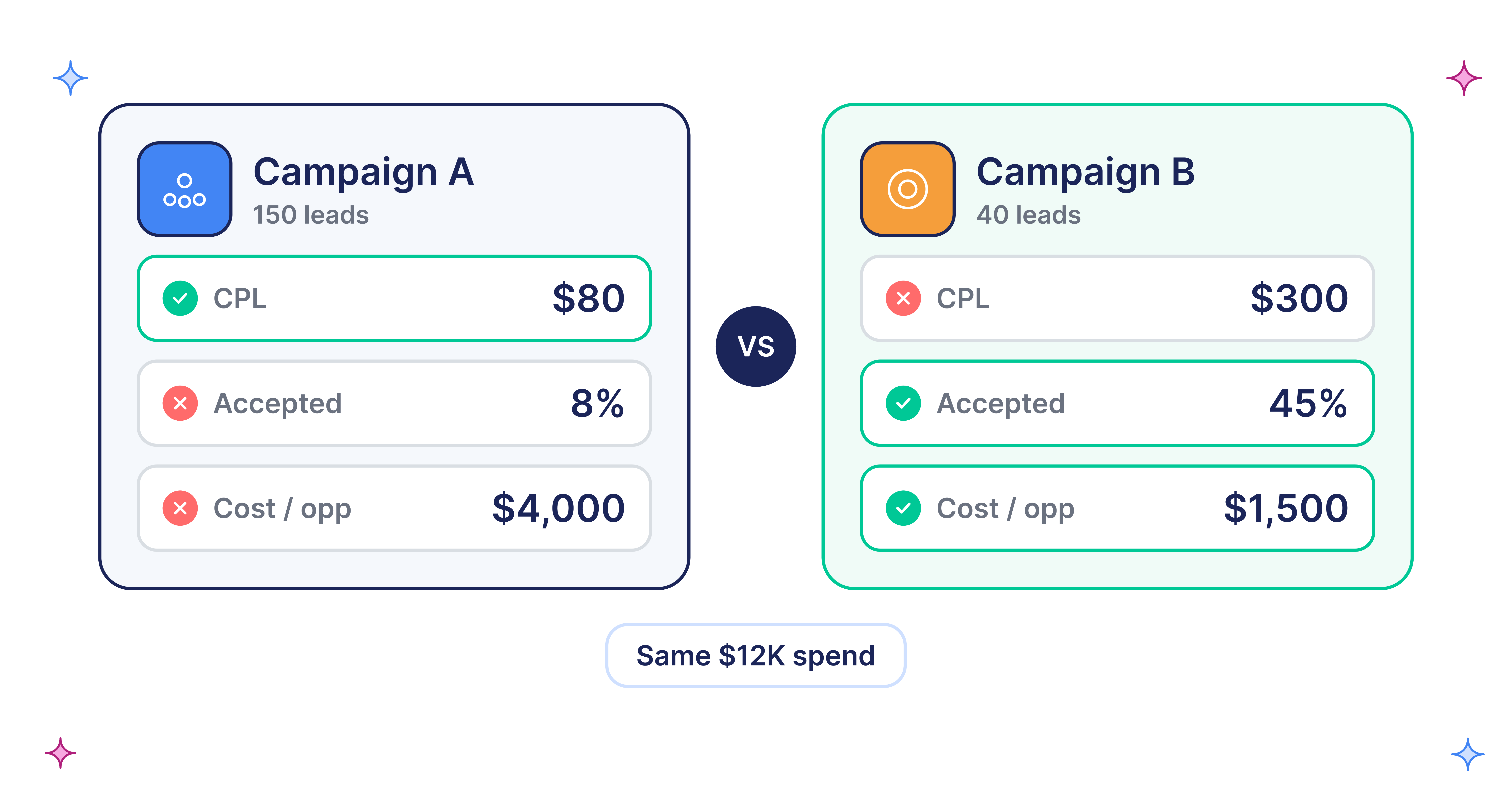
Honestly, international PPC usually wastes money in the first two weeks, and mostly because of settings, not strategy. A team adds the UK to its working US campaign, leaves Google's default location option on, writes nothing new, and waits. Spend goes up, CPA doubles, and the new market gets cut before anyone knows if it could have worked.
Run a new market as a test: a budget sized to answer, settings that keep spend inside the market, and rules for what happens next.
How do you launch Google Ads in a new market without wasting spend?
Launch Google Ads in a new market by building a separate campaign for that market, setting location targeting to Presence, writing ads and landing pages in the language buyers search in, and fixing measurement before launch, including consent mode in Europe. Size the test budget so you can reach about 30 conversions, read results in stages, and decide in advance what will make you scale, fix, or stop.
Which market should you test first?
Test first where you already have demand, not where the search volume looks biggest. Pull customers, signups, and closed-won deals by country from your CRM and billing, then check sessions and organic impressions by country in GA4 and Search Console. A country already sending signups without ads is a cheaper test than one you've never sold into.
Then score each candidate on the things that make paid search work after the click:
- Search demand and cost: volume and top-of-page bid ranges in Keyword Planner for your core terms.
- Language fit: whether buyers search in English or the local language, and whether your product and pages work in it.
- Pricing and payment: local currency, tax handling, and a pricing page that makes sense there.
- Sales coverage: who answers a demo request at 9 am local time.
- Legal readiness: data rules, especially for the EEA.
This is why many US SaaS companies expand to the UK, Canada, and Australia first. Language, pricing, and buying habits carry over with the least change.
The launch settings that waste spend before the first real click
Most wasted spend in a new market comes from five settings where the default or quick option is wrong for a test.
[table]
Setting | Common mistake | What it costs | What to do
Location option | Leaving "Presence or interest" on | Ads show to people outside the market who are interested in it | Set targeting to Presence only
Campaign structure | Adding the new country to a working campaign | Budget and bidding drift to whichever market converts best | Build one campaign per market
Ad and page language | Running home-market English ads everywhere | Ads match the wrong users now that language targeting is gone | Write ads and pages in the language buyers search in
Measurement | No consent mode for EEA traffic | Conversions under-count, so bidding learns from too little data | Set up consent mode v2 through a consent platform
Schedule and response | Ad schedule in home time zone; no local sales cover | Ads run at night locally; leads wait hours for a reply | Adjust the schedule; route leads to someone awake
[/table]
Presence vs Presence or interest
"Presence or interest" is the default for positive location targeting. It reaches people likely to be in your target location and people who've shown interest in it (Google Ads Help). For a SaaS test in Germany, that can include people in other countries researching Germany. Set the campaign to Presence. If you later see clicks from countries you didn't target, check the "user location" report against "targeted location" first.
Why one campaign per market
Smart Bidding chases the cheapest conversions. Put the US and UK in one campaign and budget drifts to the market with more data, usually home, so the new market looks worse than it is. Separate campaigns also give each market its own budget, target, and report. Our guide to B2B SaaS account structure covers how to keep intent tiers inside each market.
Language targeting is gone from Search
Starting September 2026, Google removed the campaign-level language setting for Search campaigns and the Search part of Performance Max. Search ads now match based on the language of your ads, using the search term language and the user's language settings (Google Ads Help).
That makes ad language a targeting decision. English ads in France will reach French users who search in English, which may be your buyers or may be students and job seekers. Check the search terms report in the first week. If you write local-language ads, the landing page needs to match. Translated ads that land on an English demo page lose most of the gain.
Consent in Europe
To use Google Ads measurement, personalization, and remarketing for users in the EEA, you must collect consent and share consent signals with Google, usually through a consent management platform or consent mode (Google Ads Help). Without it, conversions under-report. Smart Bidding then sees fewer conversions than really happened, and you may kill a market that was working.
How much budget do you need to test a new market?
You need enough budget to reach about 30 conversions in the test window, because fewer than that is mostly noise. Estimate the new market's CPA, multiply by 30, and spread it over four to six weeks. If you can't afford that, test a cheaper conversion or a smaller keyword set rather than a smaller budget.
Suppose a US AI sales tool books demos at a $250 CPA with a 4% conversion rate. Keyword Planner shows UK top-of-page bids around $9 for its core terms. The team assumes a lower conversion rate in a new market, 3%, so expected CPA is $9 ÷ 0.03 = $300. Thirty demos need about $9,000, or roughly $215 a day over six weeks.
Two cautions. Keyword Planner bid ranges are estimates, and new campaigns have no conversion history, so start on Maximize Conversions without a target. Don't copy the home market's Target CPA into a market with different costs. Google says a new bid strategy shows Learning for up to 7 days and suggests judging results over two conversion cycles or two weeks, whichever is longer (Google Ads Help).
How to read results in a new market
Read a new market in stages, because each signal arrives at a different speed.
- Weeks 1 to 2, traffic quality: Search terms, user location, and click-through rate. You're checking that you're buying the right queries in the right country. Add negatives early. Our post on spotting Google Ads spam leads covers junk traffic patterns.
- Weeks 2 to 4, conversion: Conversion rate and CPA against your expected CPA, not your home-market CPA. A low rate with good queries points to the landing page, pricing, or currency.
- Weeks 4 to 8, pipeline: Lead-to-SQL rate and opportunities, using a country field in your CRM and offline conversion tracking. This is the only stage that tells you if the market is worth money.
When a market underperforms, separate the causes before cutting it. Good queries, poor conversion: fix the page or offer. Good conversion, poor SQL rate: check lead response time and sales coverage. Poor queries: fix keywords and negatives. Only cut the market when all three look weak.
Decide before you launch: scale, fix, or stop
Write the decision rules down before the first click, and agree on them with sales and finance:
- Scale: CPA within an agreed range of expected, and SQL rate close to the home market. Move to a step-by-step budget ramp. Our guide to scaling Google Ads budget covers the guardrails.
- Fix: Traffic quality is good, but conversion or SQL rate lags. Fix the page, offer, or sales coverage, then run one more test window.
- Stop: Weak search demand, high CPCs, and poor lead quality after a full test. Pause and put the budget back into markets that work.
The same approach works for a new region inside a country, such as a new US metro or sales territory.
Case study: how FYXER added markets one at a time
FYXER, an AI email assistant, scaled Google Ads to six-figure monthly spend across the US, UK, Australia, and Canada. Markets were added progressively, as performance in each region proved expansion was worth it. Each new market started with minimal spend to validate performance, then budget grew as conversion data showed efficiency.
As the case study puts it, the approach was to "prove performance in one market, then apply the same structure to the next." Google Ads now brings in 12% of FYXER's ARR. Read the FYXER case study.
All four markets share a language and similar buying habits, which made each test cheaper to run.
The bottom line
A new market fails cheaply or wastes money slowly, and the difference is set before launch. Choose markets where you already have demand, give each one its own campaign with Presence targeting, write ads in the language buyers search in, fix consent and measurement, and size the budget to reach about 30 conversions. Then read results in stages and follow the scale, fix, or stop rules you agreed on.
Want us to run Google Ads for you in new regions? Choose our Google Ads management services for B2B SaaS and AI companies. Click here to book a 20-minute slot with Waqas.