


Your Account Is Talking. Are You Listening to the Right Things?
ScalixAI turns what Claude surfaces into closed revenue.
Share this Article



Key takeaways
Connecting Claude to Google Ads via MCP gives you live data, not static exports.
The official Google MCP server is read-only by design. It cannot change bids or pause campaigns.
A Developer Token from Google is required. Apply early since approval takes 1–2 business days.
GAQL (Google Ads Query Language) is how Claude queries your account. You don't need to write it.
MCP gives you faster diagnostics, but strategy and optimization decisions still require human judgment.
Connecting Claude to Google Ads via MCP turns a conversational AI into a live campaign analysis tool.
It doesn’t require any CSV exports, dashboard toggling, or manual data pulls. The connection runs through the official Google Ads MCP server, takes 10–15 minutes to configure, and gives Claude direct read access to your account data through a secure API layer.
This guide covers the exact setup steps, the credentials you need before you start, and the first audit queries worth running once you're connected.
Let’s get started.
What "Connect Claude to Google Ads" Actually Means And How MCP Makes It Work
Connecting Claude to Google Ads via MCP means giving Claude direct, authenticated access to your live account data through the Google Ads API.
MCP is Anthropic's open standard for linking AI models to external platforms. It acts as the bridge between Claude Desktop and Google's advertising infrastructure.
Without MCP, using Claude for Google Ads means manually exporting reports, pasting data into a chat window, and asking questions about stale numbers.
With MCP, Claude queries your account in real time. You ask "which campaigns are overpacing budget today?" and get a live answer, not a CSV-based approximation from last Tuesday.
The official Google Ads MCP Server was released by Google's Marketing Solutions team and is the canonical implementation for this integration.
It exposes two core tools: list_accessible_customers (returns your account list) and search (runs GAQL queries against your account). The entire reporting layer collapses to those two calls.
One important boundary: the server is read-only by design. It cannot modify bids, pause campaigns, create ad groups, or change budgets. This is an intentional guardrail, which means you can connect this to Claude without a security review process, because the worst-case outcome of a bad query is a confusing response, not a broken campaign.
For context on the broader landscape of Claude-to-ads connectors before choosing your setup method, the best Claude connectors for ad management guide covers the full comparison.
Prerequisites: What You Need Before You Start
[table]
Requirement | Details | Where to Get It
Claude Desktop | The desktop app, not the web interface | claude.ai/download
Python 3.10+ | Required to run the MCP server locally | python.org
Google Cloud Project | For OAuth credentials and API enablement | console.cloud.google.com
Google Ads Developer Token | Required for API access. Apply separately | Google Ads API Center
OAuth 2.0 Credentials | Client ID and Client Secret from Google Cloud | Google Cloud Console
Google Ads Account | Manager (MCC) or single account access | ads.google.com
[/table]
The Developer Token is the piece that trips up most setups. You apply for it inside your Google Ads account under Tools → API Center. Basic access is granted automatically.
Standard access (required for production use) requires an application that takes 1–2 business days. Apply for this first; everything else can be configured while you wait.
Step-by-Step: Connecting Claude to Google Ads via MCP
Step 1 — Install the Google Ads MCP Server
Open your terminal and clone the official repo:

Step 2 — Configure Google Cloud OAuth Credentials
In Google Cloud Console:
- Create a new project (or use an existing one)
- Enable the Google Ads API
- Go to Credentials → Create Credentials → OAuth 2.0 Client ID
- Set Application Type to Desktop App
- Download the credentials JSON file — save it as client_secret.json in your project folder
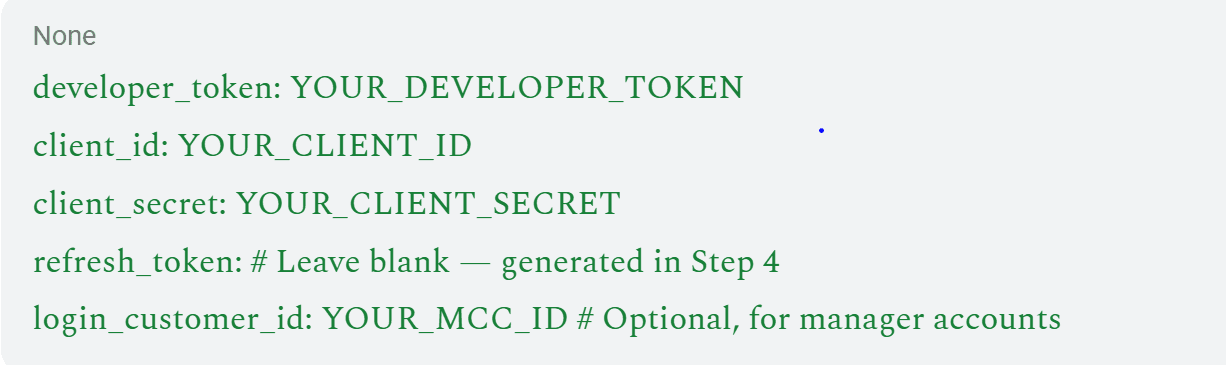
Step 3 — Add Your Developer Token
Create a google-ads.yaml file in your project root:
Step 4 — Authenticate via OAuth
Run the authentication flow:

This opens a browser window. Sign in with the Google account that has access to your ad account. Approve the permissions. A refresh token is written automatically to your google-ads.yaml file. This token handles automatic re-authentication going forward; you won't need to repeat this step.
Step 5 — Connect to Claude Desktop
Open Claude Desktop's configuration file:
Mac: ~/Library/Application Support/Claude/claude_desktop_config.json
Windows: %APPDATA%\Claude\claude_desktop_config.json
Add the MCP server block:
Does Claude Desktop MCP work with Google Ads Manager (MCC) accounts?
Save the file and restart Claude Desktop.
Step 6 — Verify the Connection
In Claude Desktop, type:
"List all accessible Google Ads accounts."
If it returns your account names and IDs, the connection is live. If it returns an error, check that the path in the config file matches your actual server location and that your Developer Token is active.
Your First Campaign Audit — Queries Worth Running Immediately
Once connected, these are the queries I'd run first on any account. Each one returns something you can act on.
[table]
Query | What to Ask Claude | What You Get Back
Budget pacing | "Which campaigns are overpacing or underpacing their daily budgets today?" | Live pacing status — catch overspend before the end of the day.
Wasted spend | "Pull search terms from the last 30 days with 30+ clicks and zero conversions. Rank by spend." | Dollar-ranked budget leak list
Quality Score | "Show Quality Score for all active keywords. Flag everything below 7 and group by ad group." | QS breakdown with underperformers isolated
Impression share | "Show impression share lost to budget vs. lost to rank per campaign, separately." | Two distinct problems that need different fixes
Weekly summary | "Generate a weekly performance report with WoW deltas for CTR, CPC, conversions, and CPA." | Stakeholder-ready summary in under 60 seconds
[/table]
For the full library of structured audit prompts, including attribution lag analysis, ad copy performance splits, and competitor overlap reports, the Claude AI Google Ads skills guide has 15 copy-paste prompts with expected outputs for each.
Common Setup Errors and Fixes
[table]
Error | Likely Cause | Fix
Developer token not approved | Basic access only, Standard not yet approved | Wait for Standard access approval or use a test account
Invalid client secret | Wrong OAuth credentials type selected | Recreate credentials as Desktop App type, not Web
Refresh token expired | The token hasn't been used in 6 months | Re-run authenticate.py to generate a new refresh token
MCP server not found | Incorrect path in Claude config | Use the absolute path, not a relative one
No accounts returned | Login customer ID mismatch | Add the correct MCC ID to google-ads.yaml
[/table]
Use our Google Ads ROI Calculator to see the gap between your current spend and the pipeline it should be generating, before you touch a single campaign setting.
What MCP Connection Gives You — And What It Doesn't
The MCP connection gives Claude live read access to your account. That's genuinely useful for diagnostics, reporting, and surfacing problems that would otherwise take hours to find manually.
What it doesn't give you: the judgment layer. Claude can tell you three campaigns are underpacing, and one is burning through budget at 140% pace. It cannot tell you whether the overpacing campaign is doing so because of a bid misconfiguration, a competitor pulling spend from the auction, or a conversion rate spike that makes the additional spend profitable.
Those are different situations with different responses, and only someone with deep account context and platform expertise can distinguish between them.
For B2B SaaS companies specifically, the AI for Google Ads guide covers how to build structured workflows around what the MCP connection surfaces.
The Google Ads optimization checklist is worth running through once your diagnostics are live, as it covers the structural fixes that audit data tends to reveal.
The Bottom Line
Connecting Claude to Google Ads via MCP is one of the most practical infrastructure changes a paid media team can make right now. The setup takes 15 minutes. The ongoing value compounds every week.
The skills you run after the connection matter more than the connection itself. The Claude marketing skills for B2B SaaS guide covers how to build a prompt library that produces real decisions, not just data summaries.
And when the diagnostics consistently surface the same structural problems, such as wasted spend, Quality Score decay, attribution gaps, campaigns training on the wrong conversion signals, that's when the MCP setup has done its job, and the strategy needs to take over.
ScalixAI manages Google Ads end-to-end for B2B SaaS and AI companies. We use tooling like this as part of a broader system, but the outcomes come from the decisions made on top of the data, not the data itself.
If your account is producing diagnostics but not pipeline, our Google Ads management for B2B companies is where that gap gets closed.
Book a free account audit, and within 20 minutes, we'll show you what the data is actually telling you.

.png)
.png)
