


Not sure what your HubSpot is sending to Google Ads?
Share this Article



Key takeaways
Connecting HubSpot is easy; choosing which stage Google optimizes toward matters most.
Smart Bidding learns only from what you send, so send qualified SQLs.
HubSpot's native lifecycle events use fixed values, not each deal's actual amount.
Lifecycle conversion events never backfill, so create them before you need data.
Set expected value per stage: ACV multiplied by that stage's close rate.
The HubSpot Google Ads integration takes about 10 minutes to connect. Making it improve lead quality is harder, because the real work is deciding what HubSpot tells Google Ads to optimize for.
Many B2B SaaS teams connect the two accounts, turn on auto-tracking, and let Smart Bidding optimize on form fills. It finds more people who fill in forms. Some are buyers. Many are students, job seekers, vendors, and bots. Sales sees a full inbox and a thin pipeline.
This guide covers the setup, then the part most setup docs skip: which lifecycle stages to sync, what values to give them, how that changes bidding, and how to report pipeline.
For the general theory, read our offline conversion tracking guide for B2B SaaS.
Let’s get started.
What does the HubSpot Google Ads integration actually do?
The HubSpot Google Ads integration links a Google Ads account to HubSpot's ads tool. It tags your ads so HubSpot can tie contacts to campaigns. It pulls spend and performance into HubSpot. And it sends CRM events, such as lifecycle stage changes, back to Google Ads as conversions.
They run in two directions:
- Google Ads to HubSpot (reporting). Spend, clicks, and impressions flow into HubSpot beside the contacts and deals each campaign produced.
- HubSpot to Google Ads (optimization). Lifecycle stage changes and form submissions sync to Google as conversion actions using Google's Enhanced Conversions. This is the direction that changes how Google bids.
Most teams set up the first direction and stop, so Google keeps bidding on whatever it optimized for before, usually form fills.
How do you connect Google Ads to HubSpot?
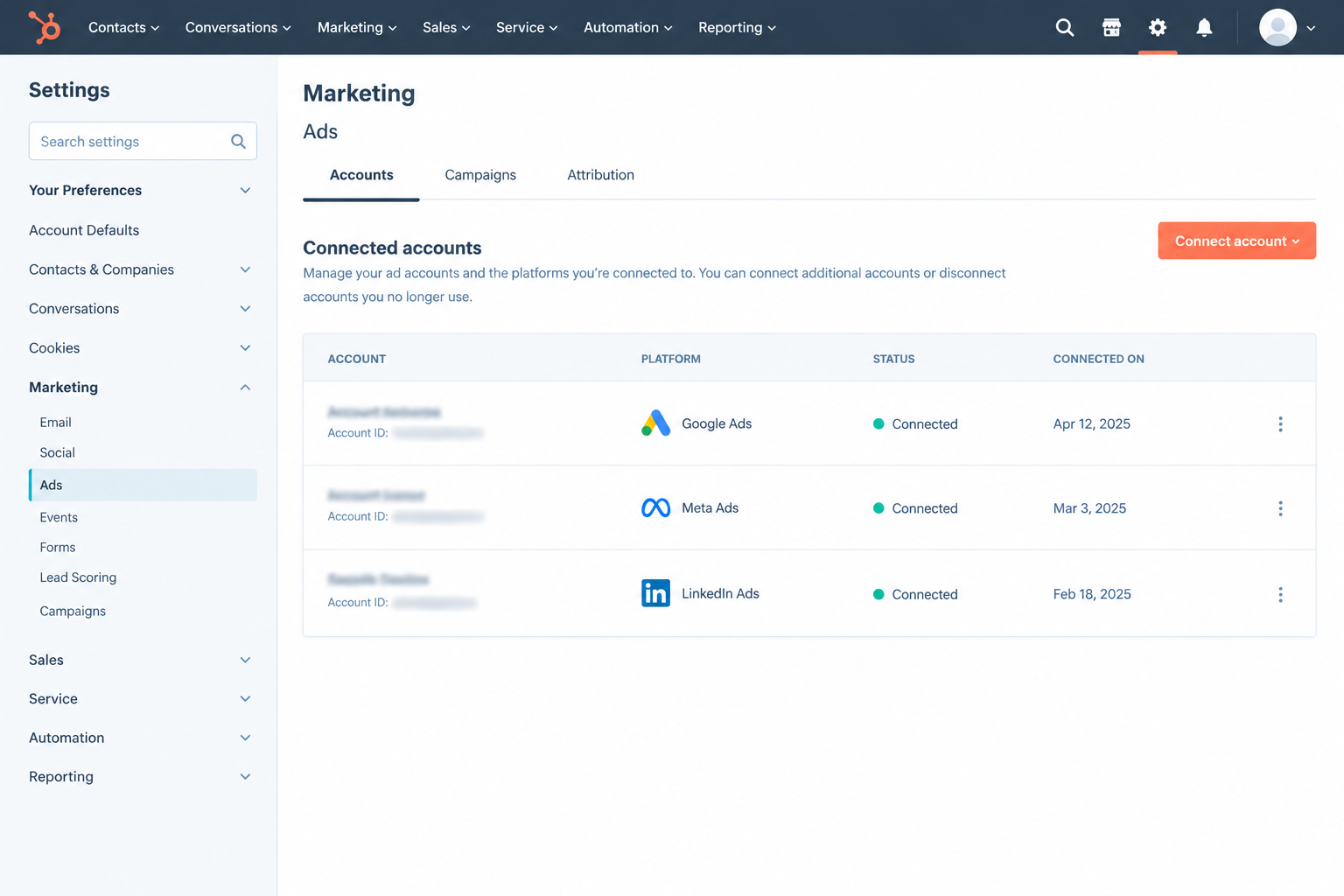
To connect Google Ads to HubSpot, open Settings, go to Marketing > Ads, click Connect account, and choose Google Ads. Sign in with a Google user who has Admin access, select the ad account, and turn on auto-tracking. Then create lifecycle stage conversion events so CRM outcomes flow back to Google.
Steps checked on October 27, 2026 against HubSpot's Knowledge Base.
- In HubSpot, click the settings icon in the top navigation bar.
- In the left sidebar, go to Marketing > Ads.
- On the Accounts tab, click Connect account, then select Google Ads.
- Log in with the Google email tied to your Google Ads account and click Allow.
- Tick the ad accounts you want to connect and click Connect.
- Turn on auto-tracking when HubSpot prompts you.
What permissions do you need?
You need Publish access to the ads tool in HubSpot and Admin access to the individual Google Ads account. Only individual accounts can connect, not manager (MCC) accounts, so connect each child account on its own.
How do you turn on auto-tracking and capture the GCLID?
Auto-tracking adds a HubSpot tracking template at the campaign level with UTM and hsa_ parameters, which lets HubSpot attribute contacts to ads. Keep Google auto-tagging on as well, so each click carries a GCLID. HubSpot can store it in the contact's Google ad click ID property, which conversion syncing uses to match people.
Redirects, link shorteners, ad-level custom templates, and cloned campaigns all break tracking. We cover each fix in why Google Ads UTMs disappear before they reach HubSpot.
For the basics, see the GCLID glossary.
How do you create a lifecycle stage conversion event?
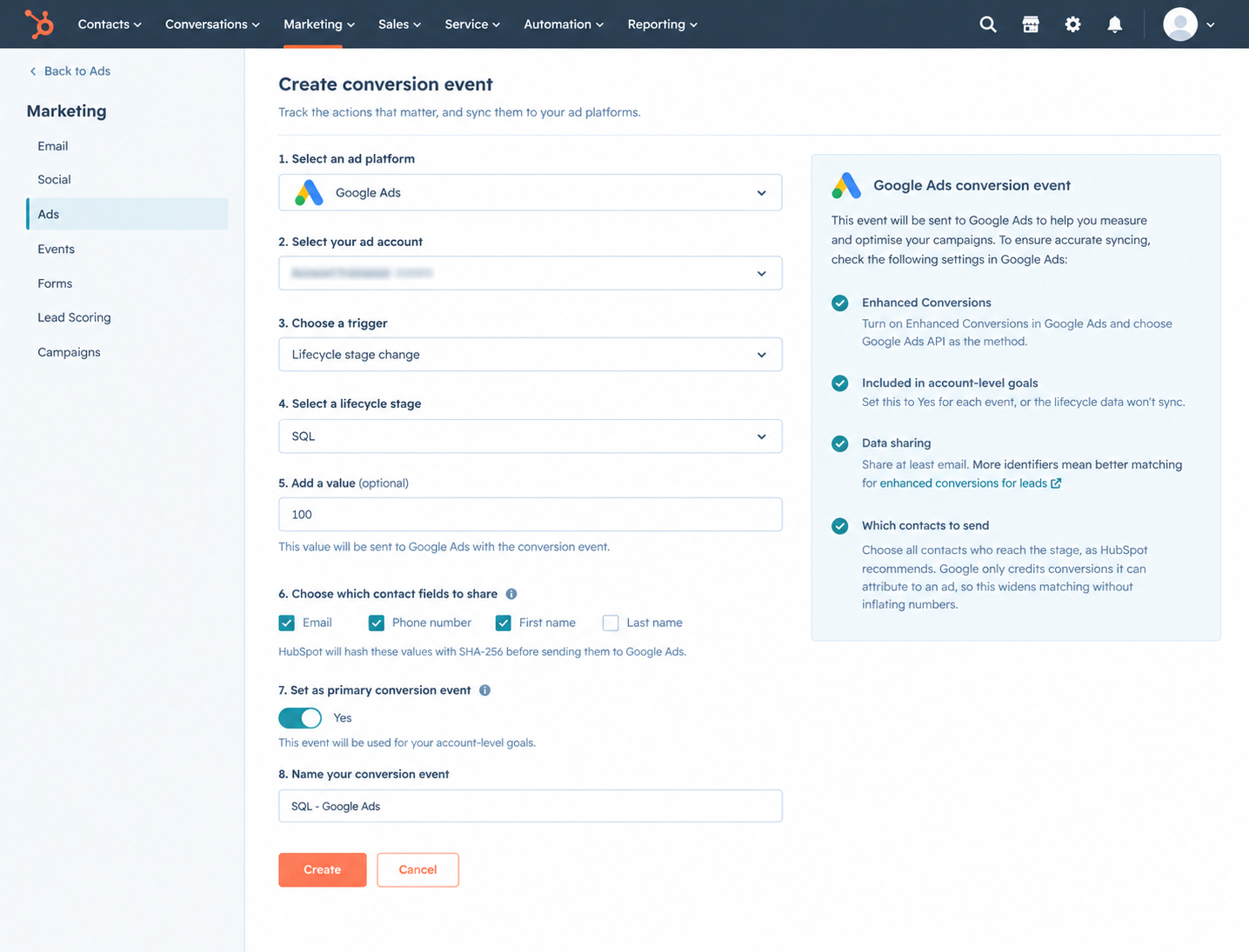
Go to Marketing > Ads, click Create, then Conversion event. Pick Google, your ad account, the Lifecycle stage change trigger, and a stage. Add a value, choose which contact fields to share (HubSpot hashes them with SHA-256), decide whether it is primary, and name it.
Four settings deserve attention:
- Enhanced Conversions in Google Ads. The first time, turn on Enhanced Conversions in Google Ads and choose Google Ads API as the method.
- Included in account-level goals. This must be set to Yes for each event, or the lifecycle data will not sync.
- Data sharing. Share at least email. More identifiers mean better matching for enhanced conversions for leads.
- Which contacts to send. Choose all contacts who reach the stage, as HubSpot recommends. Google only credits conversions it can attribute to an ad, so this widens matching without inflating numbers.
Event limits depend on your plan, per HubSpot's conversion events guide. Only stage changes after you create an event are counted, so create events now even if you will not bid on them yet.
Which HubSpot lifecycle stages should you send to Google Ads?
Send Google Ads the earliest stage your sales team actually trusts. For most B2B SaaS companies, that is the SQL. Make it the primary conversion for bidding. Sync MQL, Opportunity, and Customer as secondary conversions for reporting, and move raw form fills to secondary once SQL volume is steady.
[table]
HubSpot stage | Primary or secondary | Example value | Why
Form submission or Lead | Secondary | $0 | Spends on spam and page problems, but teaches bidding nothing about buyers.
MQL | Secondary (primary only at low SQL volume) | $960 | Fast signal, but MQL rules often reward activity, not fit. See MQL vs SQL.
SQL | Primary | $3,600 | Sales accepted the lead, usually within days of the click.
Opportunity | Secondary, or primary at high volume | $7,200 | Stronger signal, but fewer events and a longer delay after the click.
Customer | Secondary | $24,000 | Truest outcome, but too rare and slow to train bidding at most Seed to Series B companies.
[/table]
Before you pick SQL, check that reps use it. Pull contacts who became Opportunity in the last 90 days and count how many an SQL date have. If reps jump from Lead straight to Opportunity, an SQL event never fires, and Google learns nothing. Fix the process, or add a workflow that sets the stage when a meeting is booked and qualified.
If your SQL means "booked a call" rather than "sales confirmed fit and budget," you are still teaching Google to find meetings, not buyers.
How should you set conversion values for B2B SaaS?
Give each stage its expected revenue: your average first-year contract value (ACV) multiplied by the share of contacts at that stage who become customers. HubSpot's native lifecycle events take one fixed value per event, not each deal's amount, so use an average.
[table]
Stage | Stage-to-close rate | ACV | Conversion value
MQL | 4% | $24,000 | $960
SQL | 15% | $24,000 | $3,600
Opportunity | 30% | $24,000 | $7,200
Customer | 100% | $24,000 | $24,000
[/table]
Take real rates from a HubSpot funnel report covering two to four quarters. With few closed deals, rates are noisy, so round them and revisit each quarter.
Watch for stacking. If MQL and SQL are both primary, a contact who reaches SQL counts as $960 plus $3,600, or $4,560, which is wrong. Either keep one primary stage, or use incremental values (MQL $960, SQL $2,640, Opportunity $3,600, Customer $16,800) so a won deal adds up to $24,000.
A fixed value hurts when deal sizes vary widely, such as a $3,000 self-serve plan next to an $80,000 enterprise contract. The average hides the difference you want Google to learn. HubSpot's suggested route is a custom build with workflows and Google's Offline Conversions API. See value-based bidding.
How does the integration change Smart Bidding?
Once a CRM stage like SQL becomes the primary conversion, Smart Bidding stops chasing the cheapest form fill. It starts bidding more for the searches, devices, and audiences that look like past SQLs. Expect fewer leads and a higher cost per lead. Judge it on cost per SQL over a full sales cycle, not lead count in week two.
Why does optimizing on form fills attract junk leads?
Smart Bidding treats every primary conversion as equally good, so a student downloading an ebook looks like a VP booking a demo. The cheapest form fills usually come from broad match, loose search terms, and low-quality placements, so Google shifts budget there. Lead volume rises, quality falls, and the system is working exactly as designed.
Waqas, who spent 9 years inside Google, puts it simply: Smart Bidding learns only from what you send it. If you send form fills, you get form fillers. Send SQLs and opportunities with values, and you get more people who look like buyers.
To clean up existing junk, see our guide to Google Ads spam leads.
How many conversions does Smart Bidding need to learn?
For Target ROAS on Search, Google recommends at least 15 conversions in the last 30 days. Google also warns that if conversions arrive 7 or more days after the click, the ramp-up for value-based bidding can take several months, per its value-based bidding guidance. B2B SQLs often arrive later than that.
This creates the real limitation: the better the signal, the fewer and slower the conversions. A working rule we use (not a Google threshold for every strategy):
- Under 15 SQLs a month: keep a strict MQL or booked demo as primary and SQL as secondary.
- 15 or more SQLs a month: make SQL primary on Maximize Conversions or Target CPA.
- Steady SQL volume plus reliable values: test Target ROAS on value.
Change one thing at a time; never the goal and bid strategy in the same week. Our Smart Bidding progression guide walks through each step.
Common HubSpot Google Ads integration problems and fixes
Most HubSpot Google Ads sync problems come from stripped tracking parameters, a blocking Google setting, events created after the data you expected, or skipped sales stages. HubSpot flags broken events in a Needs Attention section on the Events tab.
[table]
Problem | Likely cause | Fix
Google Ads account does not appear when connecting | Manager (MCC) account, missing Admin access, or wrong Google login | Connect the individual account with a user who has Admin access.
Contacts are not attributed to ads | Auto-tracking off, edited template, redirects or shorteners | Turn auto-tracking back on and remove custom templates. See our UTM troubleshooting guide.
Lifecycle events not reaching Google | Included in account-level goals set to No, or Enhanced Conversions not using Google Ads API | Set the goal setting to Yes and the method to Google Ads API.
Google shows fewer conversions than HubSpot | Google counts only conversions it can attribute to an ad, and old stage changes are never sent | Compare like for like from the event's creation date. Expect a gap.
SQL event barely fires | Reps skip SQL and jump to Opportunity | Fix stage hygiene, or set SQL with a workflow.
Conversion value looks inflated | Several lifecycle events marked primary | Keep one primary stage, or switch to incremental values.
[/table]
HubSpot integration vs Zapier vs Google Data Manager: which should you use?
Start with HubSpot's native integration. It needs no code and covers lifecycle stage events. Use Google Data Manager if you prefer to manage imports from inside Google Ads. Use Zapier or a custom API build only when you need deal-stage triggers or real deal amounts.
[table]
Option | Set up from | What triggers a conversion | Conversion value | Best for
HubSpot native integration | HubSpot ads tool | Lifecycle stage change or form submission | One fixed value per event | Most teams on Marketing Hub Starter or above
Google Ads Data Manager | Google Ads (Goals > Conversions, HubSpot as data source) | Conditions built on the Lifecycle Stage field | Check field mapping at setup | Teams that run measurement from Google Ads and Customer Match lists
Zapier | Zapier | Contact property changes or deal stage updates | Can pass a deal field | Deal-stage events without a developer
Custom build (HubSpot workflows plus Google's API) | Your developer | Anything you define | Actual deal amount | Wide ACV ranges and strict data needs
[/table]
Google's HubSpot data source page recommends moving from legacy offline conversion import to enhanced conversions for leads. Never send the same stage through two routes; it double counts and corrupts bidding.
Our offline conversion import entry covers the legacy method.
How do you report Google Ads pipeline inside HubSpot?
HubSpot's ads tool shows the contacts and deals tied to each Google Ads campaign. To report pipeline, build one weekly view by campaign that lines up spend, SQLs, opportunities, pipeline value, and cost per SQL. Make decisions on that view, not on cost per lead in Google Ads.
A simple weekly layout:
[table]
Campaign | Spend | New contacts | SQLs | Opportunities | Pipeline value | Cost per SQL
Competitor terms | from ads tool | from ads tool | lifecycle report | deal report | deal report | spend ÷ SQLs
[/table]
Deals are attributed through associated contacts, so a deal with no contact drops out. Look at 60 to 90 days before cutting a campaign, because SQLs lag spend. A campaign with a high cost per lead and a low cost per SQL is often your best one.
Our Google Ads weekly report template and B2B SaaS attribution guide go deeper on both.
Scalix sets this up during onboarding: CRM conversion events, an SQL definition agreed with sales, and weekly pipeline reporting. For Delve, we imported offline conversions so SQL signals fed bidding, and Google Ads produced $5.59M in attributed pipeline in the first 90 days (Scalix client data, 1 account, from April 2025).
Read the Delve case study for the full setup.
Conclusion
The HubSpot Google Ads integration takes minutes to connect. It only improves lead quality once Google bids on a stage your sales team trusts, with a fair value attached.
ScalixAI provides Google Ads services to B2B SaaS and AI companies. We work with some of the top brands in the world. Get your audit now!
.png)
.png)
